


.svg)



If you need fast, general-purpose forms, Jotform's drag-and-drop templates are hard to beat. If you want a conversational form experience with deep built-in analytics, Typeform leads that category. But if you're collecting sensitive or personal data and privacy is non-negotiable, BlockSurvey is the best of the three. This comparison is written for people who treat the security, privacy, and consent of the data they collect as a hard requirement, not a nice-to-have.
Finding the right tool gets harder when you're handling sensitive information. So this piece looks closely at three popular online form builders, Jotform, Typeform, and BlockSurvey, and compares them feature by feature from a privacy-centric viewpoint.
Jotform and Typeform are both capable, with a range of features and integrations. BlockSurvey takes a different starting point. It is built on a privacy-first approach, and every response is encrypted end-to-end, so not even BlockSurvey can read it.
The question, then, is which one actually holds up for a privacy-minded team, and which one fits a job where keeping responses safe is the whole point. The sections below work through each area so you can decide.
Ease of Use
Jotform: Known for its drag-and-drop form builder, Jotform makes creating forms easy and intuitive. The interface is user-friendly, and there's a vast range of templates to choose from.
Typeform: With its unique conversational approach, Typeform presents a refreshing take on form building. The tool has a bit of a learning curve due to its unique design, but once you get the hang of it, creating forms is straightforward.
BlockSurvey: BlockSurvey offers a streamlined interface that is easy to navigate, though its design customization may not be as extensive as the other two. Simplicity in design often translates into ease of use for the end-user.
All three platforms are known for their user-friendly interfaces, with simple drag-and-drop features for creating forms. Jotform and Typeform are particularly recognized for their easy-to-use, intuitive design. BlockSurvey also offers a straightforward interface that's easy to navigate, even for beginners. It combines the simplicity of traditional form builders with advanced privacy features, which makes it a strong choice for anyone who values both ease of use and data security.
Privacy
Jotform: Jotform uses encryption for data security. However, as a centralized service, data privacy is based on Jotform's controls and systems. You cannot have complete control over your data ownership.
Typeform: Typeform ensures data encryption and has a comprehensive privacy policy, but past data leaks from Typeform raise real questions about its data privacy. Like Jotform, it's a centralized service, meaning data privacy relies on Typeform's security measures.
BlockSurvey: BlockSurvey puts a strong emphasis on user privacy and data protection. BlockSurvey enables digital rights for the users. Meaning, the account or identity ownership and data ownership is with the user and not with the platform provider. With BlockSurvey, all your data is encrypted end to end and you have the keys for them. This prevents data breaches, leaks, and harvesting trust issues, and that obviously increases survey response rates.
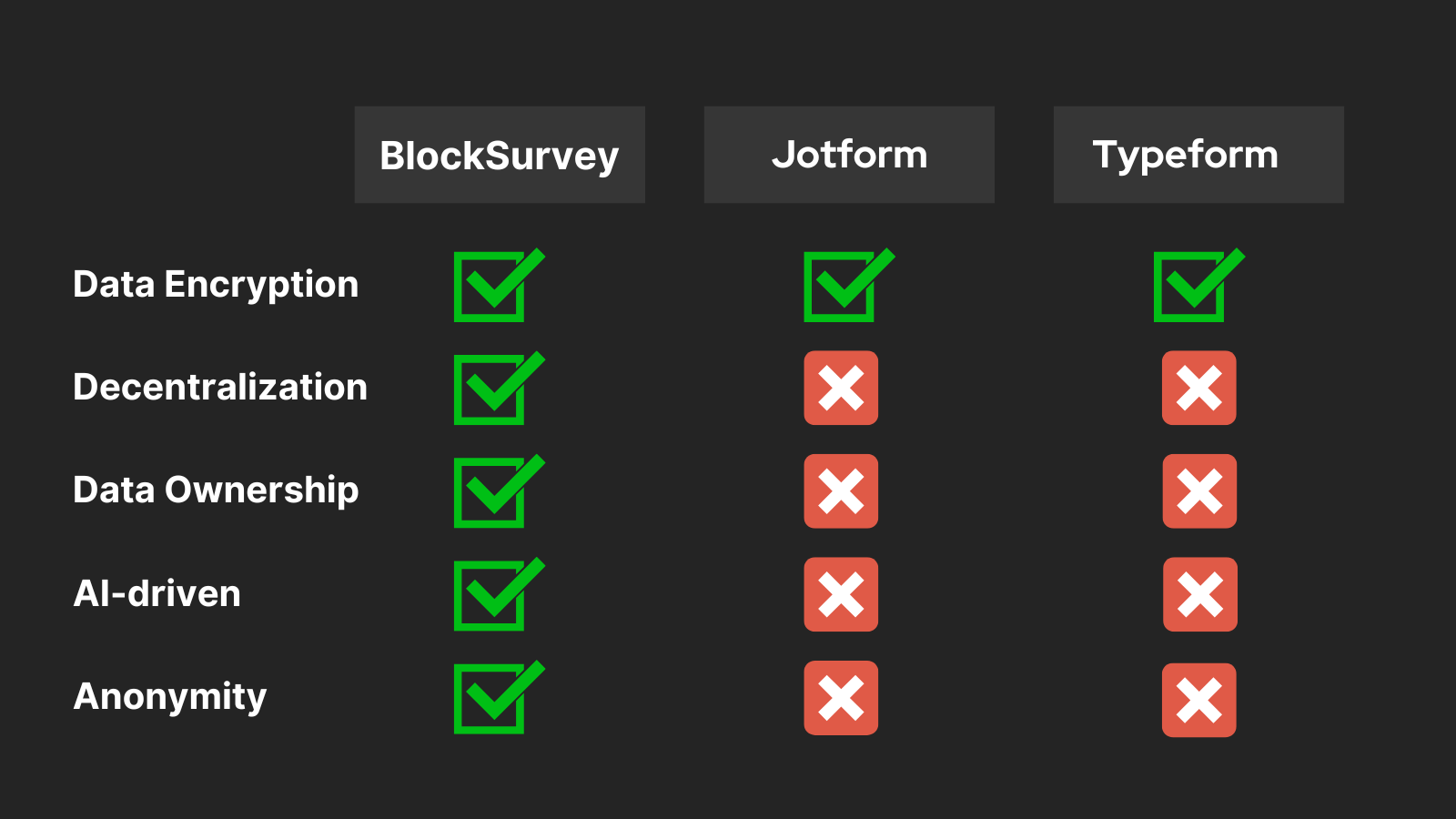
On privacy, BlockSurvey is the clear leader. Jotform and Typeform offer standard data protection measures, while BlockSurvey encrypts your data end-to-end before it ever leaves your device, so it stays private and accessible only to you. Not even BlockSurvey can read it. Its encryption system provides end-to-end security for your responses. In an age when data privacy matters more each year, that focus on secure data collection makes it the most reliable choice for privacy-conscious users.
White Labeling
Jotform: With its paid plans, Jotform offers custom branding, allowing you to remove Jotform branding and add your own.
Typeform: Typeform also provides white labeling capabilities in its higher-tier paid plans. You can add your own logo and branding to the forms you create.
BlockSurvey: BlockSurvey is a true white label survey software. You can customize URLs, logos, fonts, brand colors, and more. You can completely customize your surveys through BlockSurvey.
White labeling lets you create forms that match your brand's look and feel. Both Jotform and Typeform offer it, so you can align your forms with your brand. BlockSurvey goes a step further. You can customize your forms with your logo and branding, and you can do it without worrying about third-party access to your data. That combination of branding control and strong privacy protection makes BlockSurvey a good fit for businesses that want brand consistency without giving up data security.
AI-Driven Surveys
Jotform & Typeform: Neither Jotform nor Typeform offered AI-driven survey options.
BlockSurvey: Blocksurvey is the only online survey tool that uses AI to help create online surveys. If you have ever needed to build a survey and struggled to come up with the right questions, this helps. Their AI-driven surveys can suggest questions based on your topic, which is useful when you're stuck with writer's block. Let Blocksurvey handle the first draft and put a working survey together quickly.
Analytics
Jotform: Jotform offers built-in analytics features that provide useful insights. It allows you to view form analytics, understand how users interact with your forms, measure traffic, and see submission rates. You can view these statistics directly on the platform, which can be helpful for optimizing your forms for better engagement.
Typeform: Typeform is strong in the analytics department, with detailed built-in analytics. You can access metrics such as the completion rate, average completion time, and drop-off points, allowing you to refine your forms based on the insights provided. Typeform also integrates with Google Analytics for a deeper understanding of user behavior.
BlockSurvey: BlockSurvey provides the essential analytics you need on form and survey responses. The data analytics focuses more on the received responses,
Jotform, Typeform, and BlockSurvey all provide analytics features so you can review and analyze your form data. Jotform and Typeform offer more visual analytics tools, while BlockSurvey focuses on keeping the data private, which can be the deciding factor if you're handling sensitive information.
BlockSurvey's analytics may not be as visually detailed as the others, but it keeps your data private and secure. When you're dealing with sensitive data, that is a real advantage on its own.
To wrap it up
After comparing JotForm, Typeform, and BlockSurvey, BlockSurvey stands out as the strongest option for privacy-conscious users. It pairs solid features and security with a user-friendly interface and flexible data collection. Whether you're running surveys, feedback forms, or other data collection, BlockSurvey offers an experience that combines simplicity, privacy, and useful tooling, which makes it a reliable pick for most form-building needs.
Want a closer one-on-one look? Read our detailed JotForm vs BlockSurvey and Typeform vs BlockSurvey comparisons.
Jotform vs Typeform vs BlockSurvey- A Holistic feature based comparison FAQ
What are the main differences between Jotform, Typeform, and BlockSurvey?
How does BlockSurvey ensure data privacy and security?
Can BlockSurvey handle AI-driven surveys?
How does BlockSurvey compare to JotForm and Typeform in terms of customization options?
Get insights.
Unlock value.
- 14-day free trial
- Set up in minutes
- End-to-end encrypted