


.svg)



- What is a multilingual survey?
- Survey translation with BlockSurvey
- Uses of a multilingual survey
- What are the advantages of a multilingual survey?
- Best practices for using a multilingual survey
- How to use a multilingual survey in BlockSurvey
- Additional use cases
- Multilingual Survey Tools Compared
- Right-to-Left (RTL) Language Support
- Supported Languages
- Conclusion
Language barriers make it hard to reach people across different regions. A multilingual survey solves this by letting you convert a survey from one language to another, so it can be distributed to and completed by people who speak different languages. This is useful when you run research or gather feedback from a population that speaks more than one language.
- What is a multilingual survey?
- Survey translation with BlockSurvey
- Uses of a multilingual survey
- What are the advantages of a multilingual survey?
- Best practices for using a multilingual survey
- How to use a multilingual survey in BlockSurvey
- Additional use cases
- Multilingual Survey Tools Compared
- Right-to-Left (RTL) Language Support
- Supported Languages
- Conclusion
What is a multilingual survey?
The multilingual survey feature lets you translate a survey into different languages so it reaches a wider audience and stays accessible to everyone. It makes gathering feedback from a global audience easier and lets the survey creator capture the opinions of a larger number of people.
Survey translation is a practical tool for survey designers. It translates a survey into another language quickly and accurately. You can create surveys in several languages, including English, Spanish, French, German, and others. The survey is translated into the language you select, so participants read and understand it as intended.
Survey translation with BlockSurvey
BlockSurvey uses LingvaNex Translate services to translate your survey into another language. Reaching your audience in their native language matters, which is why we translate surveys into more than 100 languages. With multilingual surveys, you can reach more people and get more out of each survey. The translator keeps the translated surveys accurate and consistent.
With BlockSurvey's survey translation, you translate your surveys into any language you need. Select the language you want to translate into, and the survey is translated automatically. You can make changes through the built-in translation editor. You can also add as many languages as you like and let participants pick their language at the start of the survey.
Uses of a multilingual survey
- Gather information from a diverse group of people who speak different languages.
- Run academic research on the attitudes and behaviours of people from different cultural backgrounds.
- Gather feedback from employees or customers of a company that operates in multiple countries or regions.
- Get insights on customer preferences, attitudes, and behaviours across different cultures.
- Improve customer service by offering support in a customer's preferred language.
What are the advantages of a multilingual survey?
- Increased response rate: Offering the survey in multiple languages can raise the response rate and help make the data you collect representative of the target population.
- Better representation of target population: A multilingual survey gathers information from a diverse group of people who speak different languages, which gives a more accurate picture of the target population.
- Improved accuracy of data collection: By reducing language barriers, a multilingual survey improves accuracy, since all participants can understand and respond to the questions being asked.
- A better understanding of global customer base: By collecting data from different regions and cultures, a multilingual survey helps organizations understand their global customer base and make informed business decisions.
- Improve communication: A multilingual survey helps organizations communicate with customers and employees who speak different languages.
Best practices for using a multilingual survey
- Test the survey with native speakers: Before you distribute the survey, test it with native speakers of each language to confirm that the questions are clear and easy to understand.
- Use clear and simple language: Avoid jargon or complex language in the survey, since it can make questions hard for participants to understand and answer.
- Be consistent with terminology: Use the same terminology across all languages to avoid confusion and keep the data you collect comparable.
- Provide clear instructions: Give clear instructions in each language on how to complete the survey.
- Collect feedback: Ask participants for feedback about the survey and use it to improve the survey for future distributions.
How to use a multilingual survey in BlockSurvey
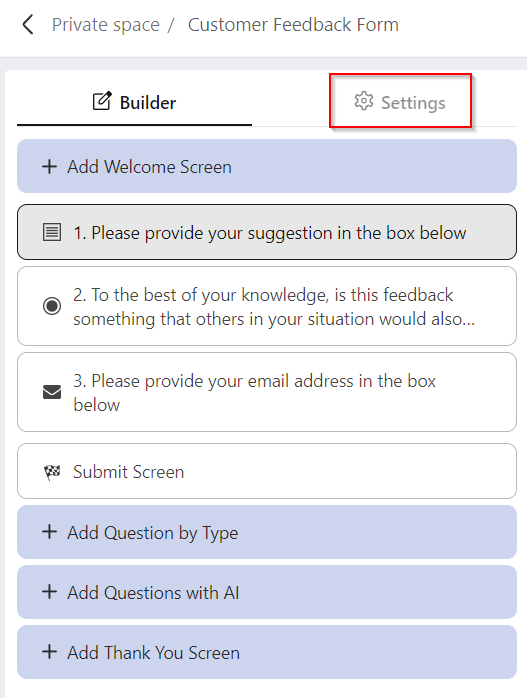
Step 1
Once the survey has been created, go to "Settings".
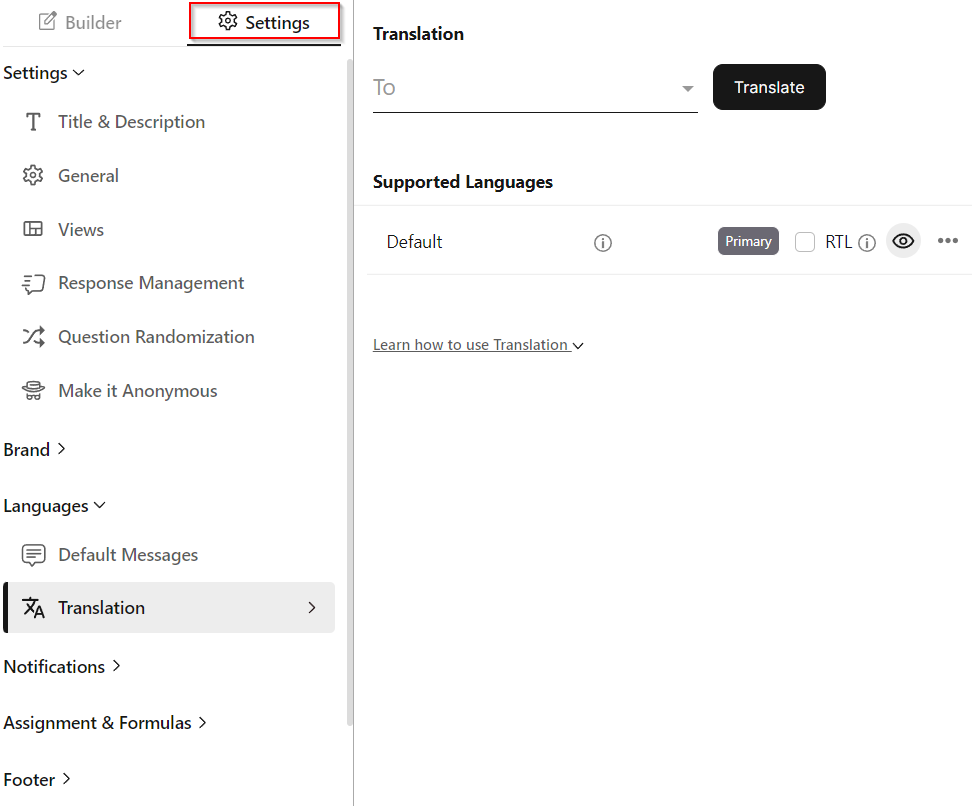
Step 2
The Translation settings are under the Languages section. Add any language you want to convert your survey to under Translation.
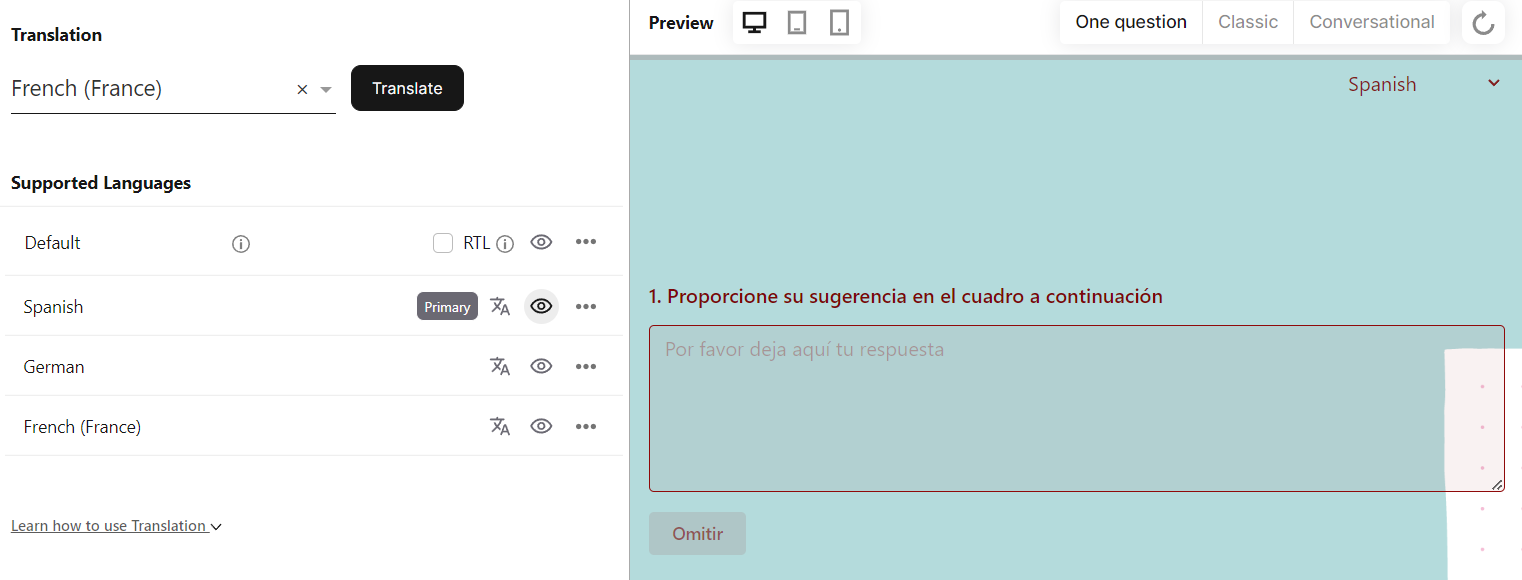
Step 3
Set any language as the primary survey language, and preview how the survey looks from the preview tab.
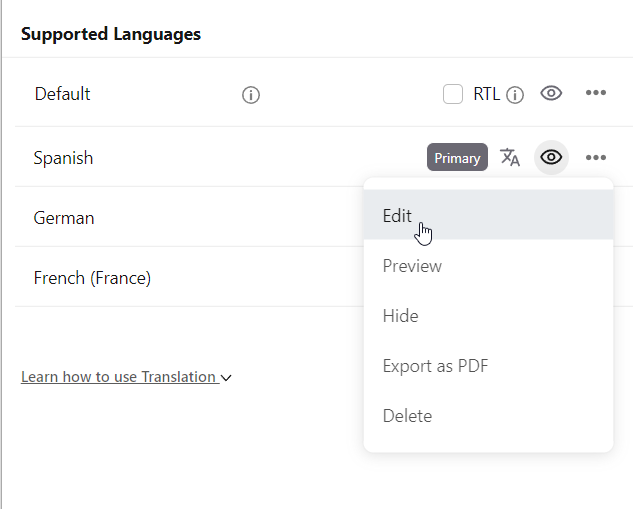
Step 4
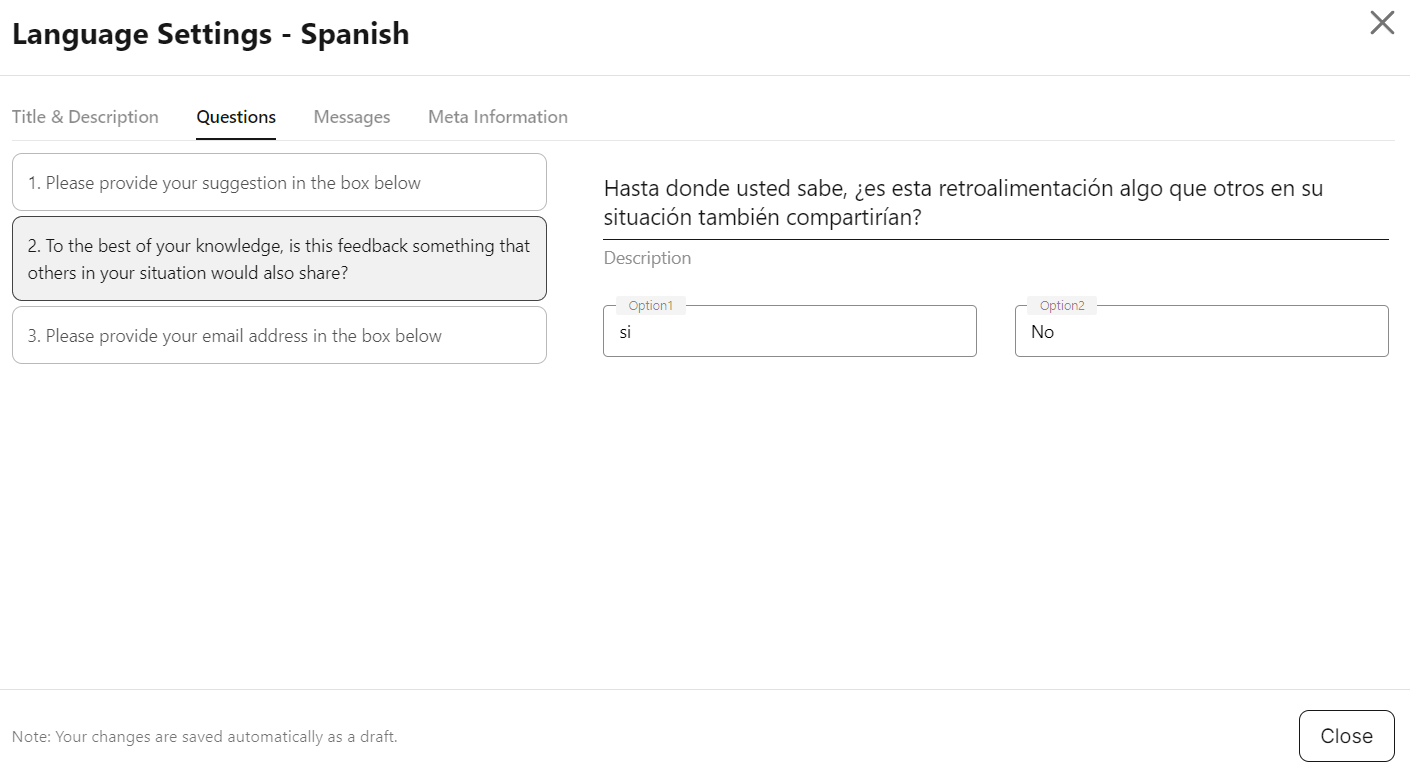
Edit the translation of questions, title, description, and messages manually by clicking "Edit".
Step 5
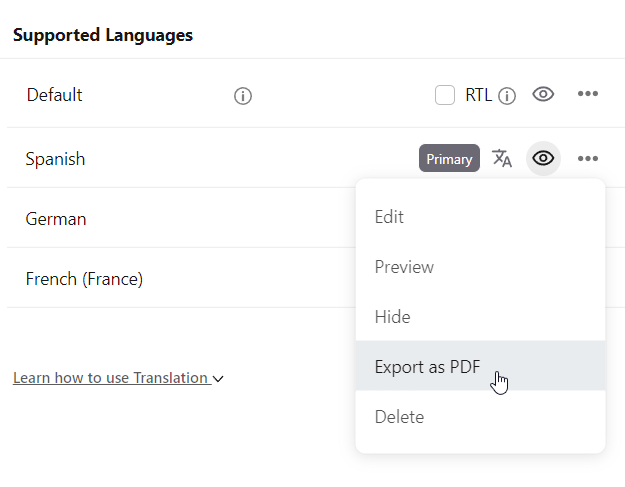
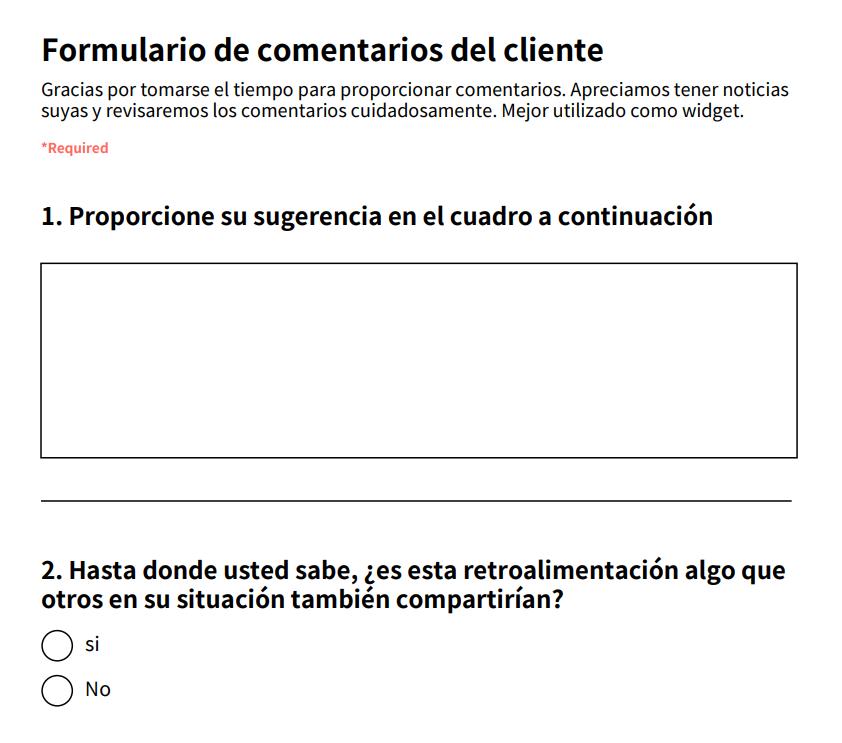
Download them as a PDF by clicking "Export as PDF".
Additional use cases
Example: A movie feedback survey/form is created in English in the builder.
Use Case 1: Translating the survey to multiple languages
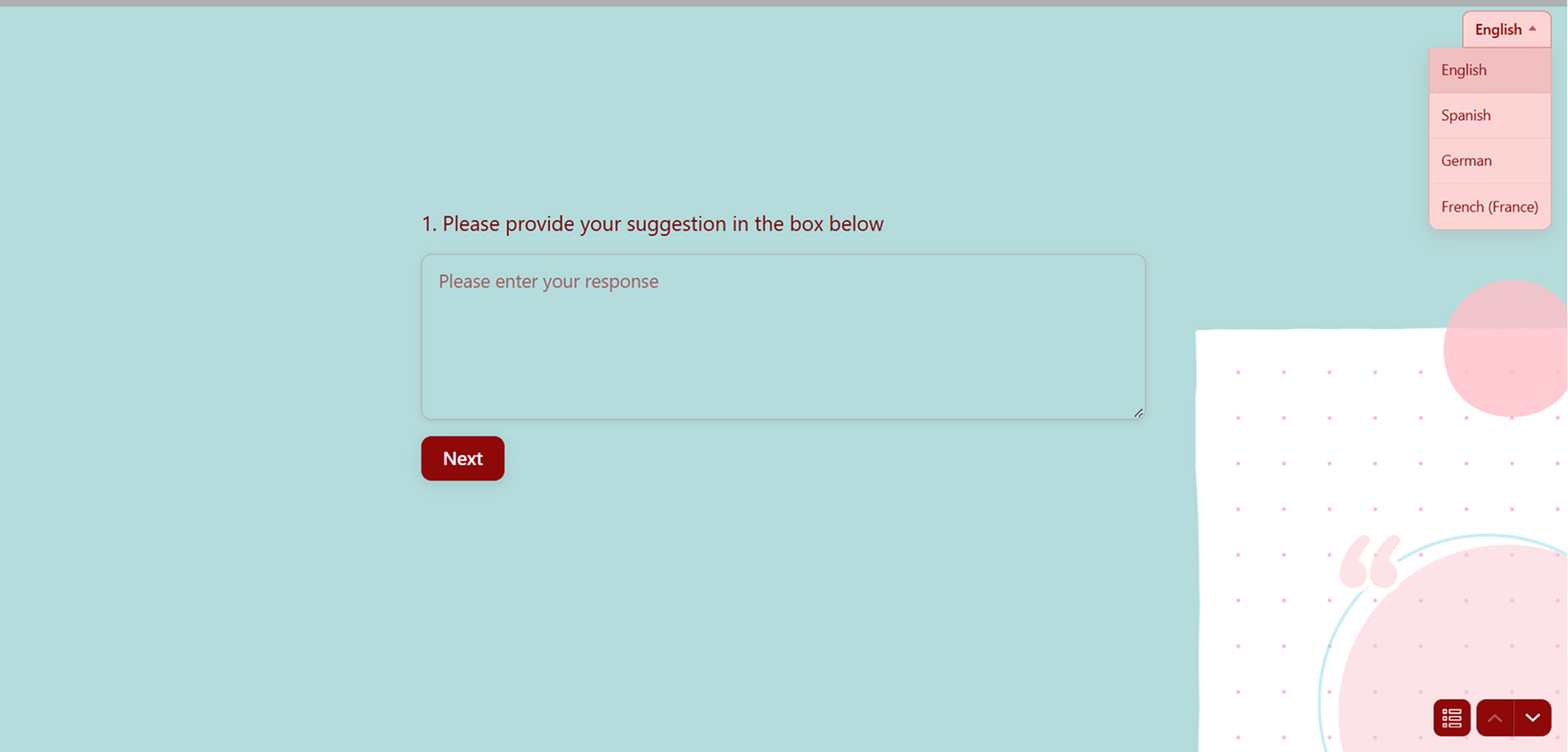
Select the "From" language (English) and the "To" language (Spanish) to translate the survey. You can translate the survey/form into as many languages as you want. On the survey-taking screen, respondents can select their preferred language from the dropdown list.
Use Case 2: Setting a primary language
From the list of languages, set a "Primary" language (Spanish as primary). The form/survey then displays primarily in Spanish, but respondents can still select their preferred language from the dropdown list.
Use Case 3: Displaying the survey in right-to-left (RTL)
Check the "RTL" checkbox when a language like Arabic is used in the builder to create a form/survey.
Use Case 4: Customized link by language selection
Use the customize link feature on the "Share" screen, select a language from the dropdown list, and create a custom URL. The link takes the user to the survey in the selected language.
Multilingual Survey Tools Compared
This table compares how leading survey tools handle multiple languages, automatic translation, right-to-left (RTL) scripts, and respondent privacy. Competitor rows reflect each vendor's own documentation. Cells marked "Not documented" mean the vendor does not publish that detail.
| Tool | Languages supported | AI auto-translation | Right-to-left (RTL) support | Anonymity / encryption |
|---|---|---|---|---|
| BlockSurvey | 100+ | Yes, automatic translation via LingvaNex, with a built-in editor to refine or upload your own translations | Yes, an RTL checkbox in the builder for languages such as Arabic | End-to-end encrypted, with anonymous survey options |
| SurveyMonkey | Not specified | No, translations are added manually by downloading and re-uploading translation files | Limited: Arabic, Hebrew, and Persian display in RTL, other languages are not supported in RTL | Not documented |
| Qualtrics | 100+ | Yes, automatic translation via Google Translate or Amazon Translate | Yes, for languages such as Arabic and Hebrew | Not documented |
| Jotform | 130+ | Yes, one-click automatic translation that can then be edited | Limited: Arabic RTL is achieved through custom CSS on classic layouts | Not documented |
| Google Forms | No native multilingual mode | No, there is no built-in translation, users rely on separate forms or Google Translate | Not documented | Not documented |
Right-to-Left (RTL) Language Support
Scripts like Arabic, Hebrew, and Persian read from right to left, so the survey layout has to flip to match. In BlockSurvey, when you add a right-to-left language such as Arabic, you check the RTL checkbox in the builder and the questions display in the correct direction. Support across other tools varies: SurveyMonkey applies RTL only to Arabic, Hebrew, and Persian, Qualtrics changes the editor direction for languages like Arabic and Hebrew, and Jotform requires custom CSS to force RTL on classic layouts.
Supported Languages
BlockSurvey translates surveys into more than 100 languages. Translation runs through LingvaNex, and you can adjust any wording in the built-in translation editor or upload a file with your own translations. This lets you publish one survey to a global audience while keeping the responses end-to-end encrypted.
Conclusion
A multilingual survey gathers information from a diverse group of people who speak different languages. It fits a range of situations, such as market research to understand consumer preferences in different regions, or academic research on the attitudes and behaviors of people from different cultural backgrounds. It helps across different parts of research and feedback gathering, including raising response rates, improving data collection accuracy, and showing cultural sensitivity.
Explore related BlockSurvey features: accessible surveys and white-label surveys.
Survey Translation & Multilingual Surveys: Create Multi-Language Surveys FAQ
How many languages can one survey support?
Should you use AI translation or upload your own translations?
How do you validate a survey questionnaire in another language?
How do you create a Google Forms survey in two languages?
Does BlockSurvey support right-to-left (RTL) languages like Arabic?
What is a multilingual survey?
Get insights.
Unlock value.
- 14-day free trial
- Set up in minutes
- End-to-end encrypted