


.svg)



Respondents often hold back honest feedback when they think their answers can be traced back to them. Anonymous surveys remove that concern by cutting the link between a person and their response.
BlockSurvey's Anonymous Survey feature keeps responses private, so people can answer openly. This article covers what anonymous surveys are, why they help, how to create one in BlockSurvey, and where they work best.
What is an Anonymous Survey?
An anonymous survey does not collect personally identifiable information (PII), and responses cannot be linked back to any individual. Even when you collect opinions, feedback, or sensitive data, there is no way to track who gave a specific answer.
What are the benefits of Anonymous Surveys?
- Encourages Honesty: When people know their answers cannot be traced back to them, they feel safe sharing what they actually think.
- Reduces Bias: Respondents don't have to worry about giving answers that sound "right" or "acceptable." They can say what they really think without pressure.
- Increases Response Rates: More people are willing to take a survey when they know their identity won't be revealed.
- Builds Trust: When organizations assure people that their responses are private, it helps create a sense of trust and comfort.
- Encourages Open Feedback on Sensitive Topics: People may hesitate to talk about personal experiences, workplace issues, or health concerns if their identity is known. Anonymous surveys help them speak freely.
- Removes Fear of Judgment or Retaliation: Employees, students, or customers can give honest feedback without worrying about how it might affect their job, grades, or relationship with a company.
- Leads to More Accurate and Useful Insights: Honest answers mean organizations get real feedback, which helps them make better decisions based on what people truly think.
How to create an Anonymous Survey in BlockSurvey?
Creating an anonymous survey in BlockSurvey is straightforward. Follow these steps to keep your respondents private:
Step 1
Create a new survey and add your survey questions in the Design screen.
Step 2
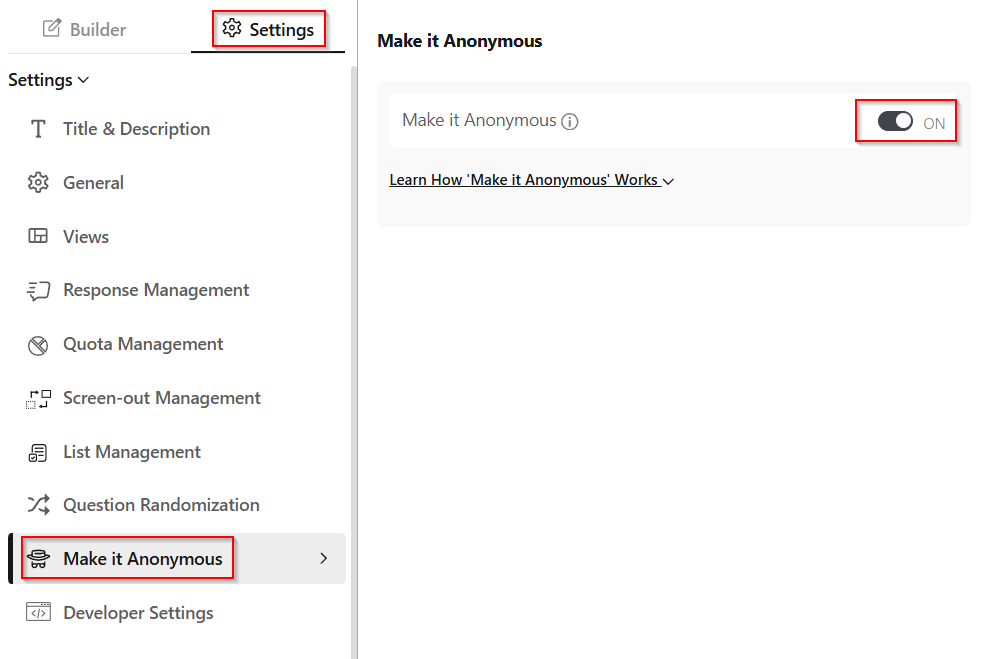
Go to Settings → Make it Anonymous and toggle it on.
Step 3
The AI checks the question types, questions, and description text in the survey against the anonymity criteria. If any content could identify a respondent, you cannot enable Make it Anonymous until those questions are removed.
Step 4
Once anonymity is confirmed, publish the survey and share it with respondents.
What happens when you enable the Anonymous Mode?
- No IP addresses, browser details, or device information are collected.
- Custom data added to the survey URL is not tracked.
- If respondents access the survey via Tor Browser, Onion Routing turns on automatically, adding an extra layer of encryption that keeps their IP addresses untraceable.
How Do Respondents Know the Survey is Anonymous?
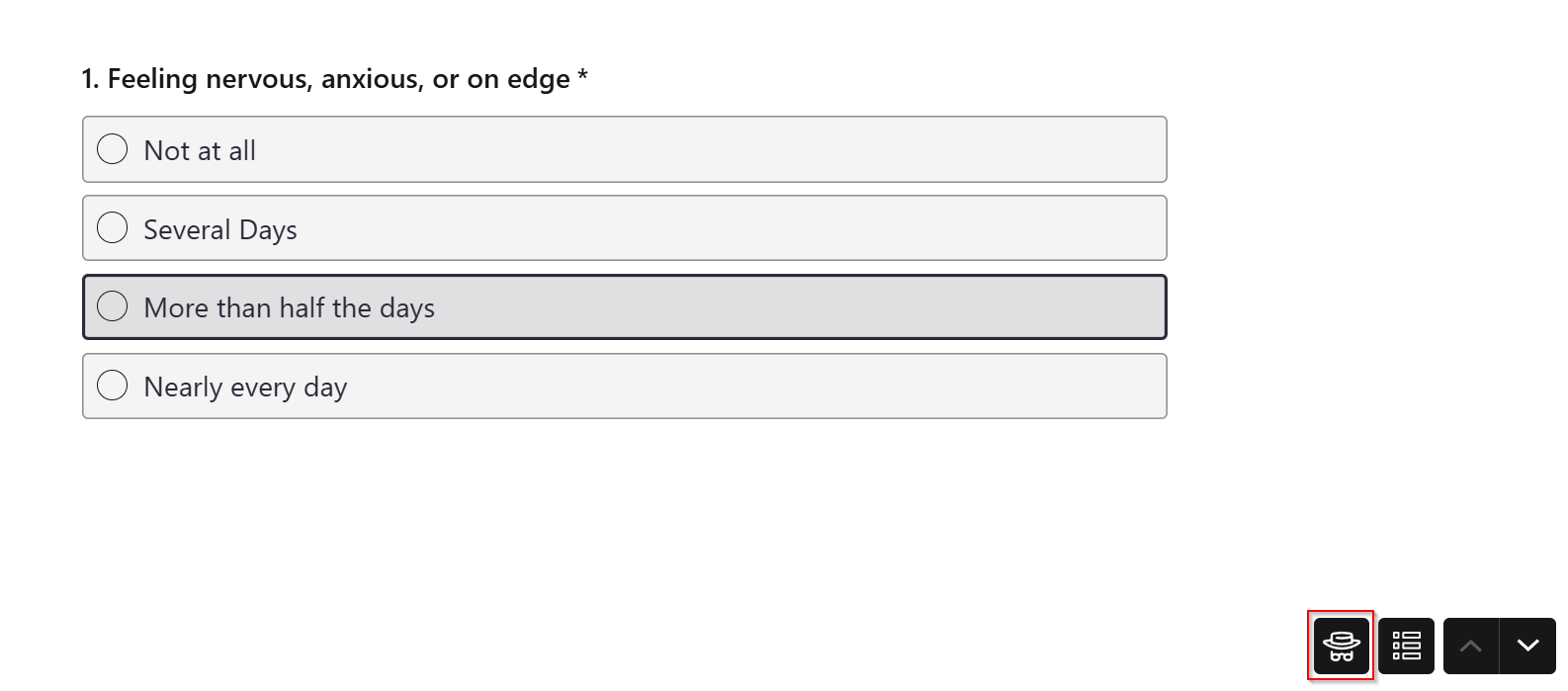
An "Anonymous Seal" appears on the survey-taking screen, showing respondents that no personally identifiable information (PII) is being collected. It confirms that their responses stay private and cannot be traced back to them.
Use Cases for Anonymous Surveys
Anonymous surveys fit any situation where privacy leads to more honest feedback. Some common examples:
- Mental Health or Health Assessments: People feel more comfortable sharing personal health concerns when they know their identity is protected.
- Customer Feedback Surveys: Businesses can gather honest opinions about their products or services, which helps them improve without biased responses.
- Employee Feedback Surveys: Employees can express workplace concerns, share suggestions, or report issues without fearing backlash.
- School or University Feedback: Students can give genuine feedback on teachers, courses, or campus facilities without worrying about negative consequences.
- Whistleblower or Ethics Reports: Employees or members of an organization can report unethical behavior, harassment, or policy violations safely and anonymously.
- Political or Social Opinion Polls: People can express their views on political or social issues without concern for public scrutiny.
- Market Research Surveys: Companies can get unfiltered consumer opinions, which helps them develop better products and marketing strategies.
What Actually Makes a Survey Anonymous
"Anonymous" means different things across survey tools. A survey is only truly anonymous when the platform does not record what could re-identify a respondent: their IP address, the tracking data attached to their invite or link, the browser and device metadata sent with each submission, and the response payload itself once it is stored. The table below checks four platforms against those four criteria, based on each vendor's own documentation.
| Criterion | BlockSurvey | SurveyMonkey | Google Forms | Typeform |
|---|---|---|---|---|
| No IP address logging | Yes. No IP addresses are collected. | Optional. Web Links record IP by default; the Anonymous Responses option turns it off. | Yes. Respondent IP addresses are not exposed to the form owner. | Yes. IP addresses are not stored; a derived Network ID is kept instead. |
| No email or link-based tracking | Yes. Custom data added to the survey URL is not tracked. | Optional. Email collectors store respondent identity by default; the Anonymous Responses option can exclude it. | Partial. Email is not collected by default, but email collection can be switched on. | Partial. Anonymous by default, but Hidden Fields can pass tracking data through the link. |
| Metadata stripped from submissions | Yes. No browser details or device information are collected. | Partial. Identifiable metadata is removed only when the Anonymous Responses option is set. | Not documented. | Partial. IP and geolocation are not stored; a Network ID is retained. |
| End-to-end encryption at rest | Yes. Responses are encrypted end-to-end. | No end-to-end encryption documented. | No end-to-end encryption; response data is readable by the provider. | No end-to-end encryption documented. |
"Optional" and "Partial" mean the platform can reduce what it records, but only after you change a setting, and the protection does not extend to the stored response data. End-to-end encryption is the criterion that separates a survey the vendor cannot read from one it can. Details reflect each vendor's published documentation as of July 2026 and may change.
Conclusion
Anonymous surveys help you gather honest, unbiased feedback by keeping respondents private. Whether you are collecting employee insights, customer opinions, or sensitive feedback, anonymity leads to more accurate responses and builds trust with your audience.
With BlockSurvey's Anonymous Survey feature, you can create secure, private surveys that encourage open and honest participation. Try anonymous surveys in BlockSurvey today and see how the responses change.
Learn more about our anonymous survey software, see how it compares in confidential vs anonymous surveys, or explore confidential surveys.
How to create an Anonymous Survey? FAQ
What is a truly anonymous survey?
Is there a free anonymous survey tool?
How do you make a completely anonymous survey?
Should feedback surveys be anonymous?
Is SurveyMonkey or any survey tool 100% anonymous?
Can anonymous surveys be used for sensitive topics?
Get insights.
Unlock value.
- 14-day free trial
- Set up in minutes
- End-to-end encrypted