


.svg)



- What is Discord identity verification?
- What is Discord gating?
- Why use Discord gating in forms and surveys?
- How to collect Discord identity in BlockSurvey and set up social gating
- Use cases of Discord gating
- Discord Survey Bots vs Web-Based Gated Forms
- How to Restrict a Survey to Your Discord Server Members
- Conclusion
Discord is now a common place for community building, with a large user base and a wide feature set. Keeping that space secure and gated is harder, whether you run a Web3, crypto, gaming, education, or professional group. You may need to confirm that the people sharing feedback in your Discord community are who they say they are, verify a respondent's Discord identity, or restrict access to a form or survey by role. Discord gating on forms and surveys handles all of this.
- What is Discord identity verification?
- What is Discord gating?
- Why use Discord gating in forms and surveys?
- How to collect Discord identity in BlockSurvey and set up social gating
- Use cases of Discord gating
- Discord Survey Bots vs Web-Based Gated Forms
- How to Restrict a Survey to Your Discord Server Members
- Conclusion
What is Discord identity verification?
Discord identity verification confirms that the person filling out a form or survey can prove their Discord profile. It works through steps like email verification and lets you collect relevant Discord data, such as display name, email, account creation date, and account servers.
What is Discord gating?
Discord social gating takes verification one step further by letting survey creators set conditions for access. You can limit access to a form or survey by the user's account age, server ID, role, or allowlist, so only qualified respondents can continue.
Why use Discord gating in forms and surveys?
- Enhance credibility: When respondents have to meet set conditions, the responses carry more trust, especially inside closed communities like Discord servers.
- Targeted responses: Gating filters respondents by account credentials, so the survey responses you get are more accurate and relevant.
- Prevent spam and bots: Verifying Discord accounts and setting conditions like account age keeps bots and spammers out and protects your community.
How to collect Discord identity in BlockSurvey and set up social gating
BlockSurvey lets you add Discord identity verification to your surveys in a few steps.
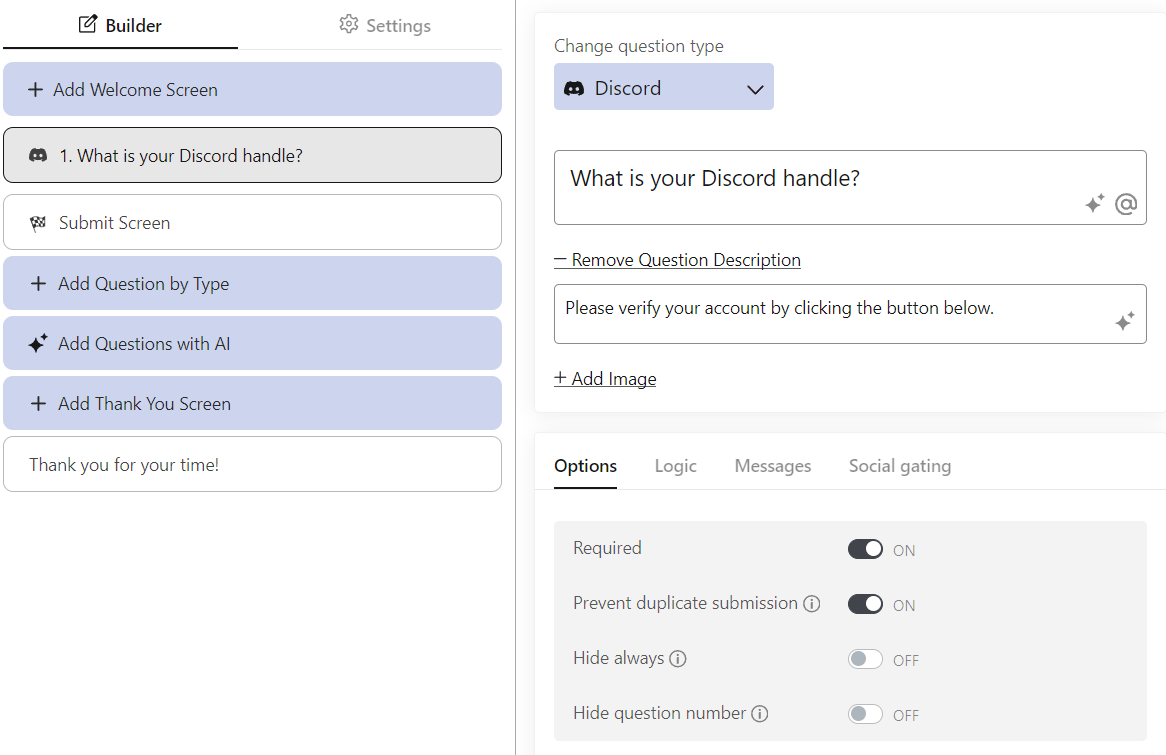
Step 1
Add the Discord social identity question to your survey so respondents are prompted to verify their Discord profile.
Step 2
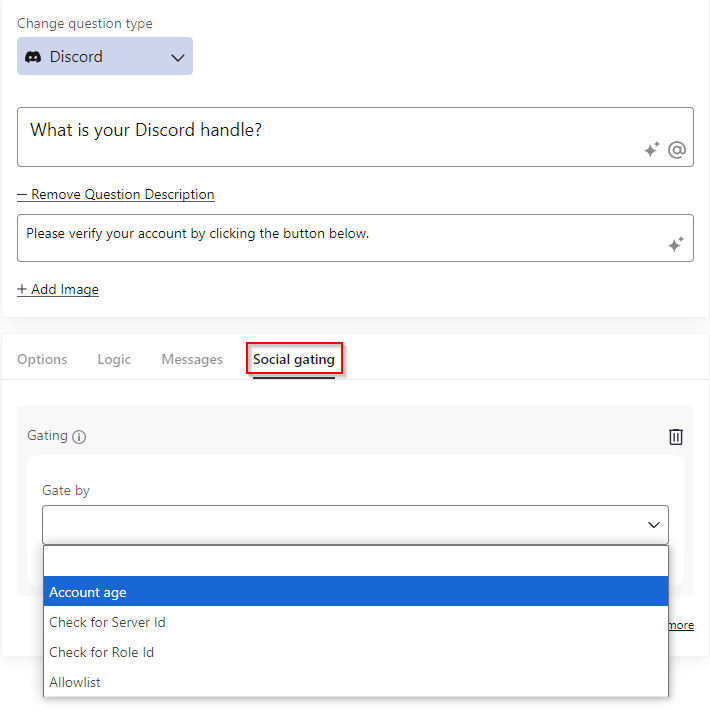
Go to the Social Gating tab and define your gating criteria. You can set conditions based on:
- Account age
- Server ID
- Role ID
- Allowlist
Step 3
You can add multiple conditions so that only users who meet all of your criteria can continue.
Step 4
Once the survey design is done, publish it and submit a test response to confirm everything works before you share it with your audience.
These steps make sure only respondents who meet your defined Discord criteria can open the survey or form.
Use cases of Discord gating
- Community feedback: Collect feedback from verified members of your Discord community by allowing only users with specific roles or server IDs to take part.
- Event registration: Run member-only events by requiring a minimum Discord account age or a specific role to register.
- Membership validation: Confirm membership and roles before granting access to exclusive content or gated sections of your community or platform.
- Whitelist campaigns: Build allowlists for beta tests or early product releases, so only selected members can complete the survey or form.
Discord Survey Bots vs Web-Based Gated Forms
Discord poll and survey bots run inside a server, while web-based gated forms live on their own page and check Discord identity before letting someone respond. The table below compares the two approaches on the four things that matter for gated research.
| Capability | Discord survey bots (e.g. Simple Poll) | Web-based gated forms (BlockSurvey) |
|---|---|---|
| Identity verification strength | Respondent is whoever is signed in to Discord in the server. The bot does not run a separate identity check. | The Discord question type verifies the respondent's Discord identity and reads display name, email, account creation date, and account servers. |
| Respondent anonymity | Available on some bots. Simple Poll offers anonymous responses that show how many times an option was selected, but not by whom. | Not anonymous in the Discord flow, because identity metadata is collected for gating. Stored responses are end-to-end encrypted. |
| Role-based access | Handled through Discord channel and role permissions that decide who sees the channel. Voter-level role gating is not documented in Simple Poll. | Yes. Gate by Role ID, Server ID, account age, or allowlist, and combine multiple conditions that all must be met. |
| NFT / token gating support | Not built in. Token or NFT gating on Discord needs a separate tool such as Collab.Land, which grants access based on token ownership. | Not part of the Discord gating flow. Gating here is based on Discord roles, servers, account age, and allowlists. |
How to Restrict a Survey to Your Discord Server Members
Use the Discord question type together with the Social Gating tab to require server membership before anyone can continue.
- Add the Discord identity question. Insert the Discord social identity question type into your survey. It verifies the respondent's Discord identity and collects display name, email, account creation date, and account servers.
- Require server membership. Open the Social Gating tab and add a condition on your Server ID so only members of that Discord server can proceed. Add Role ID, account age, or allowlist conditions if you want to narrow access further. When you add multiple conditions, a respondent must meet all of them to continue.
- Publish and test. Publish the survey and test the gating with your own account before sharing the link with your community.
Conclusion
Discord identity verification, a GitHub verification, and social gating on forms and surveys each add security, credibility, and a better experience inside your community. By verifying Discord profiles and setting your own gating conditions, you make sure the people who fill out your surveys or forms are relevant, authentic, and qualified. Whether you are collecting feedback, organizing events, or running exclusive campaigns, Discord gating helps you keep your data reliable and your community free of spam and bots.
Want to see how this fits your data collection? Try BlockSurvey's Discord identity verification and social gating.
How to verify Discord Identity and Social Gate forms & surveys? FAQ
What is Discord Gating?
Why should I use Discord gating in my survey?
How does BlockSurvey support Discord Identity Verification?
Get insights.
Unlock value.
- 14-day free trial
- Set up in minutes
- End-to-end encrypted