


.svg)



When you ask people to rate every feature, they often rate everything highly, and you learn very little about what they actually prefer. Say you are a product manager trying to find out which features your users value most. A simple rating scale can hide their real priorities because nothing forces a trade-off. Constant Sum questions solve that problem.
A Constant Sum question gives respondents a fixed number of points to split among a set of options. They have to distribute those points according to their preferences, which shows what matters most to them. Because the total is fixed, you see the relative importance of each option and get a comparison you can act on when making decisions.
What are the advantages of using constant sum questions in surveys?
Constant sum questions, called Multiple Numberboxes questions in BlockSurvey, help in several ways:
- Detailed insights: You get more granular data because each option carries a weight, so you can see how respondents rank one factor against another.
- Prioritization: The point split shows the trade-offs respondents are willing to make, which is useful in market research where consumer priorities drive decisions.
- Quantitative data: The numbers are easy to analyze statistically, so the results translate into clear, actionable figures.
- Allocation of resources: In organizational surveys, teams can use the responses to divide budgets or resources based on what employees or customers prefer.
- Avoids extreme bias: Forcing respondents to split a fixed amount stops them from rating every item high or low, so you get a more balanced view.
How to set up constant sum in BlockSurvey?
Step 1
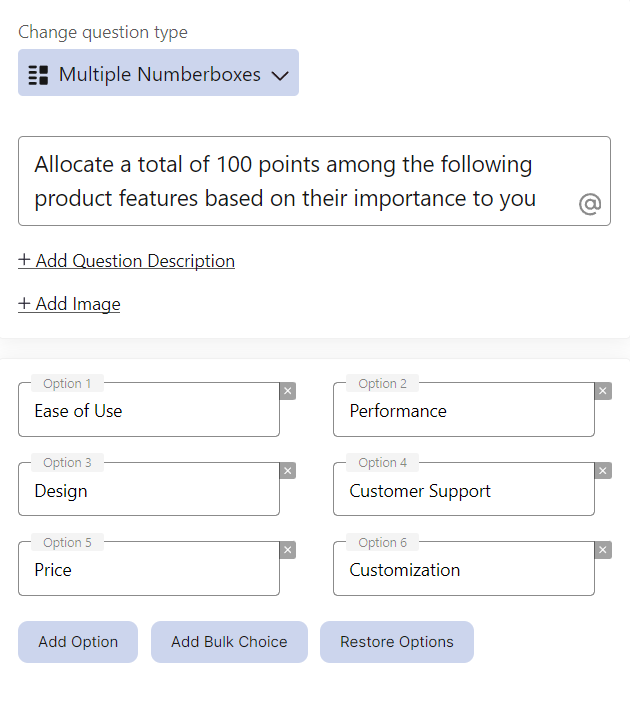
Add the Multiple Numberboxes question (also called Constant Sum) to your survey.
Step 2
On the survey screen, the input numbers add up automatically and the total is shown by default.
Step 3
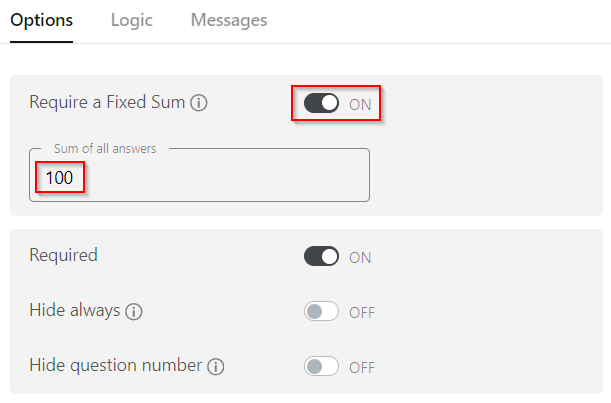
Require a Fixed Sum: To make respondents' inputs meet a set total, turn on the "Require a Fixed Sum" toggle under the Options tab and enter the total sum you need.
Step 4
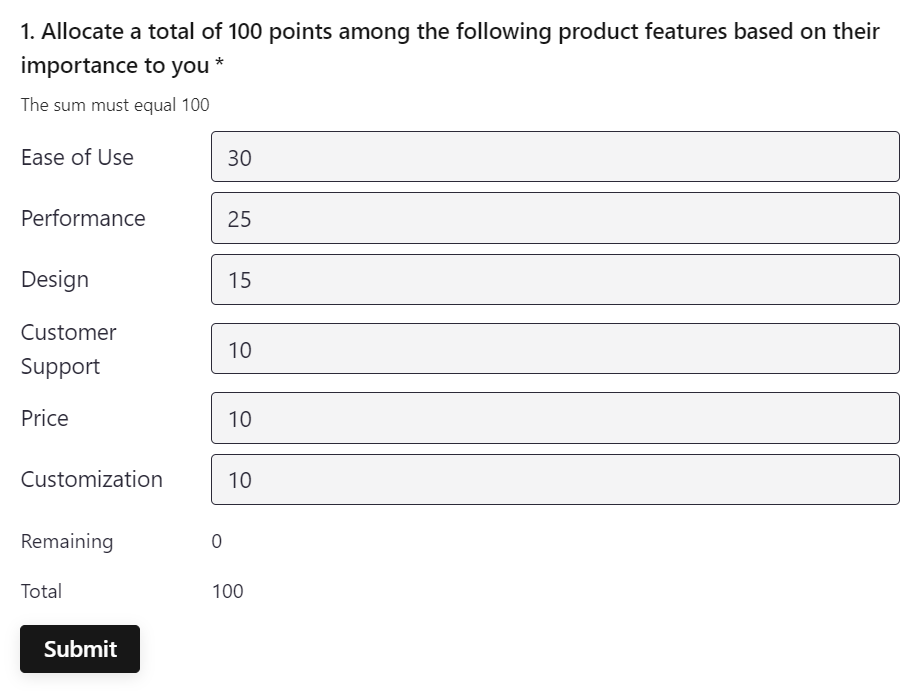
On the survey screen, respondents enter their inputs and make sure the total matches the fixed sum you set.
Use cases of constant sum
Here are some ways to use constant sum questions in a survey:
- Preference measurement: A company wants to know which product features matter most to its customers. Respondents get 100 points to split among features like price, quality, brand, and service.
- Resource allocation: A business wants feedback on how to divide its budget across departments. Employees split a fixed sum of money across departments like marketing, R&D, and operations.
- Importance ranking: In a customer satisfaction survey, respondents split points across aspects such as product performance, customer service, and price to show how much each one affects their overall satisfaction.
- Trade-off analysis: To see the trade-offs customers will make, a company asks how they would split points between cost and quality for a new product.
- Market research: To gauge demand, respondents split points among product categories or brands, which shows the ones they see as most valuable.
- Employee feedback: In an employee engagement survey, employees allocate points to factors such as work-life balance, salary, and career growth to show which ones matter most to them.
- Feature prioritization: When building a new software product, a company asks users to allocate points to potential features to decide which ones to build first.
Worked Example: Allocating 100 Points Across Marketing Channels
A constant sum question asks each respondent to distribute a fixed total across several options. The example below shows one respondent splitting 100 points across five marketing channels. In BlockSurvey you set the target by turning on the "Require a Fixed Sum" toggle and entering the total, and the form validates each response until the inputs add up to that number.
| Marketing Channel | Points Allocated |
|---|---|
| Social Media | 30 |
| 25 | |
| SEO | 20 |
| Paid Ads | 15 |
| Events | 10 |
| Total | 100 |
The point values are relative weights, not counts. Social Media at 30 points carries three times the weight of Events at 10 points for this respondent. Because the total is capped at 100, a higher allocation to one channel forces a lower allocation elsewhere, which surfaces genuine trade-offs.
Constant Sum vs Rank Order Questions
Both question types capture preference across a list of options, but they record it differently. Use this table to choose the right one for your goal.
| Dimension | Constant Sum | Rank Order |
|---|---|---|
| What it measures | Relative weight or intensity of preference, and how much more one option matters than another | Order of preference only, from most to least preferred |
| When to use | Budget allocation, resource splitting, and trade-off analysis where the size of the gap between options matters | Simple prioritization where you only need to know the sequence, not the distance between items |
| Output type | Interval-style numeric points per option that sum to a fixed total | Ordinal ranks (1st, 2nd, 3rd) with no information about the gaps |
| Analysis | Average the points each option receives across respondents | Average the rank position, or count how often each option is ranked first |
How to Analyze Constant Sum Data
Constant sum responses are quantitative, so the core analysis is a mean per option. The steps are straightforward:
- Collect the points each respondent assigned to every option.
- For each option, sum the points across all respondents and divide by the number of respondents to get the mean points per option.
- Rank the options by their mean, from highest to lowest, to see overall priority.
- Read the size of the gaps between means, not just the order, since the point totals show how much more one option is favored than another.
For example, if 50 respondents allocate to the five channels above and Social Media averages 28 points while Events averages 9, Social Media is not just ranked higher, it is weighted roughly three times as heavily across the sample. Because every response sums to the same total, the means are directly comparable and can be reported as an average allocation out of 100.
Conclusion
Constant Sum questions are a good way to get past surface-level ratings and see real preferences and priorities. Set up this question type in BlockSurvey to get detailed insights, a clear comparison across options, and a ranking you can use to make decisions. Try it in your next survey to find out what matters most to your audience.
Constant Sum is especially useful for market research surveys. Explore more BlockSurvey features or start from ready-made survey templates.
Constant Sum Questions: Budget Allocation & Points Distribution in Surveys FAQ
What is a Constant Sum question?
How is a Constant Sum question different from a regular rating scale?
What are the benefits of using Constant Sum questions?
What happens if the sum doesn’t match the required total?
Get insights.
Unlock value.
- 14-day free trial
- Set up in minutes
- End-to-end encrypted