


.svg)



Duplicate submissions quietly break survey data. You spend time building a good survey and expect clean results, but respondents often start a survey, get partway through, and realize they already took it. Retaking a survey wastes their time, and the duplicate responses distort the insights you are trying to pull from the data.
The problem gets worse when rewards are involved. If a survey offers incentives to boost participation, bots and repeat submitters have a reason to respond several times to collect more. BlockSurvey handles this with its "Prevent duplicate submission" feature.
Why prevent duplicates and how does it help?
Duplicate responses undermine everything you do with the data. A few reasons preventing them matters:
- Less cleanup: You stop spending hours hunting for and deleting duplicate rows, so you can spend that time analyzing the responses that count.
- Better respondent experience: People do not waste time accidentally submitting the same survey twice.
- Fair reward distribution: Incentives reach the people who actually participated, not those gaming the system.
- Data Integrity: Duplicate entries skew results and make some options look more popular than they are. That throws off the whole analysis. Blocking duplicates keeps each response counted once.
- Enhanced Trustworthiness: Stopping repeat submissions from the same source keeps data from online panels genuine, so you can trust it was not farmed or gamed for incentives.
How to set it up in BlockSurvey?
BlockSurvey gives you a few ways to prevent duplicate submissions, depending on what you need:
- Browser Level Prevention
- IP Level Prevention
- Question Level Prevention
Browser Level Prevention
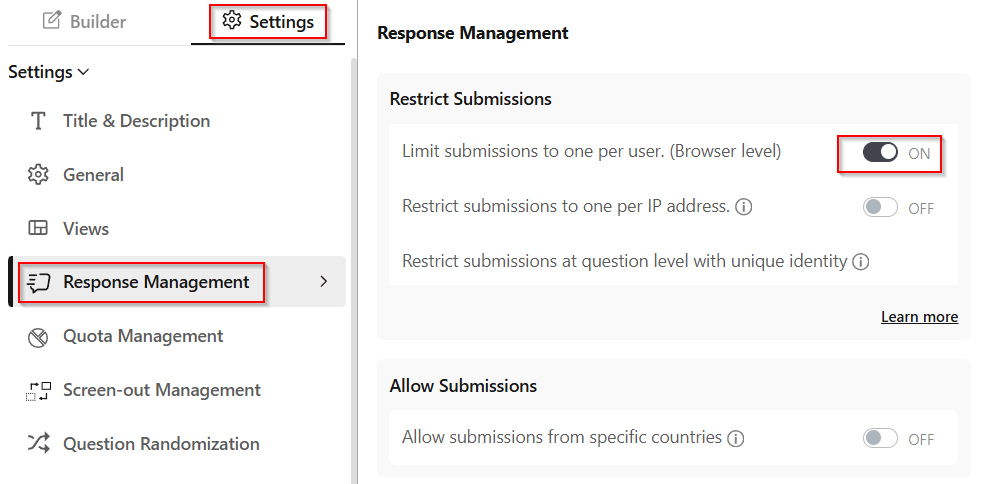
This works well for general surveys where anonymity is fine. Toggle on the "Limit submissions to one per user. (Browser level)" option under Settings -> Response Management in a survey. Respondents then cannot submit the survey more than once from the same browser.
IP Level Prevention
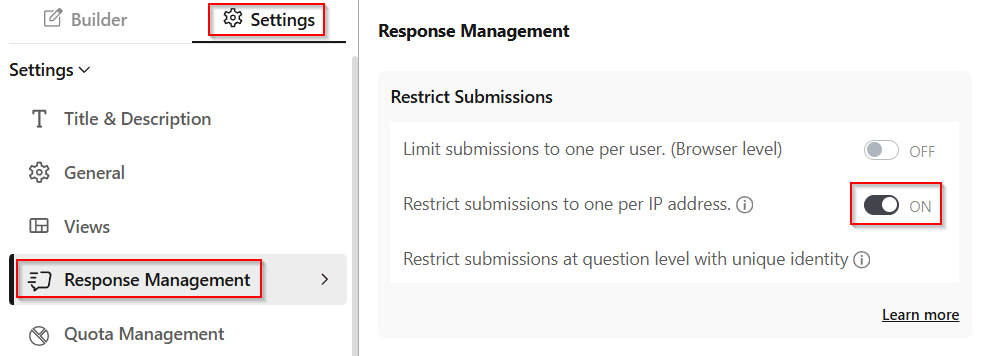
This one fits surveys where you want to block duplicate submissions across different devices on the same network. Toggle on the "Restrict submissions to one per IP address" option under Settings -> Response Management in a survey. Respondents then cannot submit the survey more than once from the same IP address.
Note: BlockSurvey hashes the respondent's IP address and stores only the hashed value. The actual IP address is never stored, so you keep duplicate prevention at the survey level without holding personal data.
Question level Prevention
For tighter results, BlockSurvey can verify the respondent's identity at the question level. Toggle on the "Prevent duplicate submission" option under the Options tab of Email, Contact form, Social, or Web 3 identity verification questions.

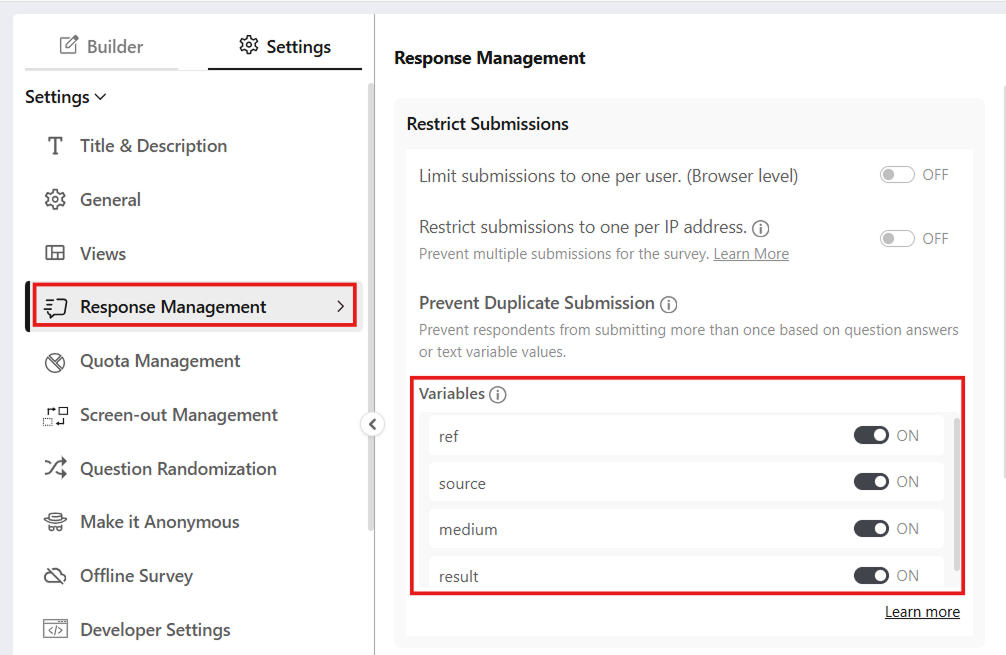
Question Answer or Text Variable-Based Prevention: BlockSurvey can prevent duplicate submissions by checking a respondent's answer to a specific question or the value of a text variable. If the same value is submitted again, the duplicate response can be blocked.
How does this work at the question level?
- Email and Contact form: BlockSurvey checks the email address. If the same address is used more than once, the second submission is blocked.
- Social identity verification: Respondents connect and verify a social account (like Twitter, Discord, Github, Google, and LinkedIn). If someone tries to submit again with the same verified account, they are stopped, so you get one response per verified social identity.
- Web3 identity verification: Respondents connect and verify a crypto wallet. If the same wallet address is used more than once, the submission is blocked. This suits surveys aimed at specific crypto communities.

What is unique about BlockSurvey's duplication prevention for Web 3 companies?
BlockSurvey adds one more option for Web3 companies: Prevent Duplicate Submission By NFT TokenID.
It helps most with NFT-gated experiences or content. If you are worried that someone could transfer their NFTs to another wallet and respond again, BlockSurvey checks all the NFT TokenIds a user holds and blocks duplicate submissions even when the NFTs move to a new wallet after the first verification. Participation stays fair and secure.

What are some use cases you should turn on Duplicate Prevention?
- Event Registrations: When you collect emails for registrations or RSVPs, blocking duplicates keeps the attendee count accurate so organizers can plan around real numbers.
- Market Research via Social Media: For market research surveys shared on platforms like Twitter, duplicate prevention keeps each user's response unique and stops anyone from skewing results with multiple submissions.
- DAOs and Community Feedback: DAOs and online communities often use NFTs for membership or voting rights. Duplicate Prevention by NFT TokenID lets each holder vote or give feedback only once, which keeps community decisions fair.
- Token Airdrops: Projects often hand out tokens as rewards to community members. Duplicate Prevention by wallet address makes sure each participant is rewarded once and keeps people from claiming an airdrop multiple times.
Which Duplicate-Prevention Method Should You Use?
Every method trades strictness against respondent anonymity and effort. The table below compares the five common approaches so you can pick the one that matches your survey.
| Method | How strict | Respondent anonymity impact | Main limitation |
|---|---|---|---|
| Browser cookie | Low | None. No identity is collected, so responses stay anonymous. | Incognito mode, clearing cookies, or switching browser or device defeats it. The cookie only lives in one browser. |
| IP address | Moderate | Low when the IP is hashed. BlockSurvey hashes the IP and stores only the hashed value, so the raw address is never kept. | A shared office, campus, or public Wi-Fi network blocks legitimate respondents who share one IP, and a VPN or mobile data gives a repeat respondent a fresh IP. |
| Question level (unique email or contact) | High | Low. The respondent has to disclose an email address or phone number. | Someone with a second email address or phone number can still submit again, and you have to collect that contact detail. |
| Unique one-time link | High | Medium. The link can stay anonymous, but each response is tied to one entry in your distribution list. | It only works when you control distribution and send each person their own link. A forwarded link can be used by whoever opens it first. |
| Authenticated sign-in (account, social, or wallet) | High | Low. The respondent must sign in with an identity such as a Google account, a social login, or a crypto wallet. | It adds friction and excludes anyone without the required account, and a respondent with more than one account can still resubmit. |
How to choose
- For a quick, fully anonymous poll where a casual repeat is acceptable, a browser cookie limit is enough.
- For a wider audience where you want to slow down repeats without collecting identity, use the hashed IP restriction, but avoid it when many respondents share one office or campus network.
- For a known audience such as customers or employees, a unique one-time link or a question-level email check gives the strongest control.
- For a token-gated or community survey, sign-in with a wallet or an account ties each response to a verified identity.
How BlockSurvey implements each method
BlockSurvey lets you combine these controls on a single survey.
- Browser and IP: limit submissions to one per browser, or restrict to one per IP address. When you restrict by IP, BlockSurvey hashes the respondent's IP address and stores only the hashed value, so the actual IP is never stored.
- Question level: mark an email or contact field so the same address cannot submit twice.
- Social and wallet: require respondents to verify a social account (such as Twitter, Discord, GitHub, Google, or LinkedIn) or a Web3 wallet, then block a repeat from the same verified account or wallet address.
- NFT tokenID: for NFT-gated surveys, BlockSurvey checks the NFT tokenID rather than the wallet, so it blocks duplicate submissions even when the NFT moves to a new wallet after the first verification.
Conclusion
Preventing duplicate submissions saves you the cleanup work and gives you data you can actually use. Respondents do not submit the same survey twice, and rewards reach the right people. With BlockSurvey's Prevent Duplicate Submission feature, each response counts once and your results stay clean.
Explore related BlockSurvey features: bot prevention, email verification, and screen-out management.
Prevent Duplicate Survey Submissions: One Response Per Person & IP Blocking FAQ
How can you prevent multiple submissions from the same person?
How does IP blocking work for survey responses?
Can surveys detect duplicate responses from the same person?
How do you limit a survey to one response per email address?
What is the difference between browser-level and IP-level duplicate prevention?
Can BlockSurvey prevent duplicate submissions if someone transfers their NFT to another wallet?
Get insights.
Unlock value.
- 14-day free trial
- Set up in minutes
- End-to-end encrypted