.svg)


Join Leading Brands across 50+ countries
Using BlockSurvey to protect their respondents' privacy, increase their survey completion rates, get better community feedback, and build better organizations.

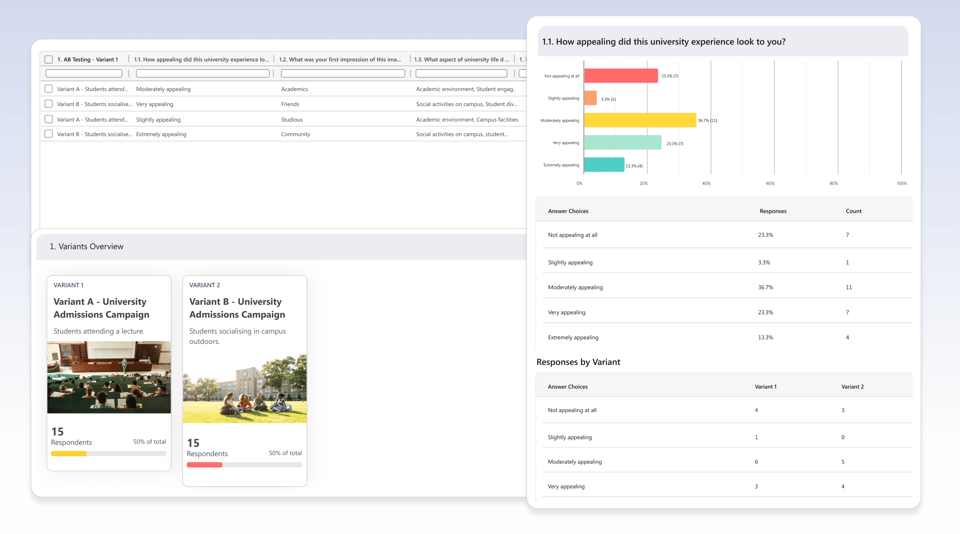
BlockSurvey's built-in A/B testing lets you show different variants to different respondents, automatically. No manual splitting. No spreadsheet juggling. Just clear, side-by-side results that tell you which version performs better.
Trusted by leading brands for secure, privacy-first surveys









Test messaging, wording, or stimulus content on a real audience before you launch or publish. Make the call with data, not opinion.

Variants are assigned automatically and remembered via local storage, so returning respondents always see the same one, keeping data clean and reliable.

Responses are tagged per variant and shown in a side-by-side table, no manual cross-tabulation or exporting needed.
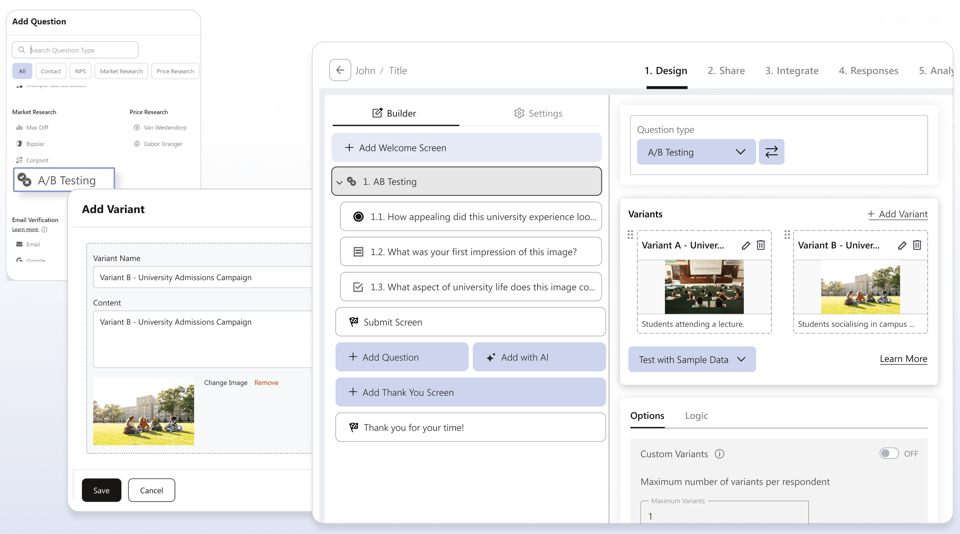
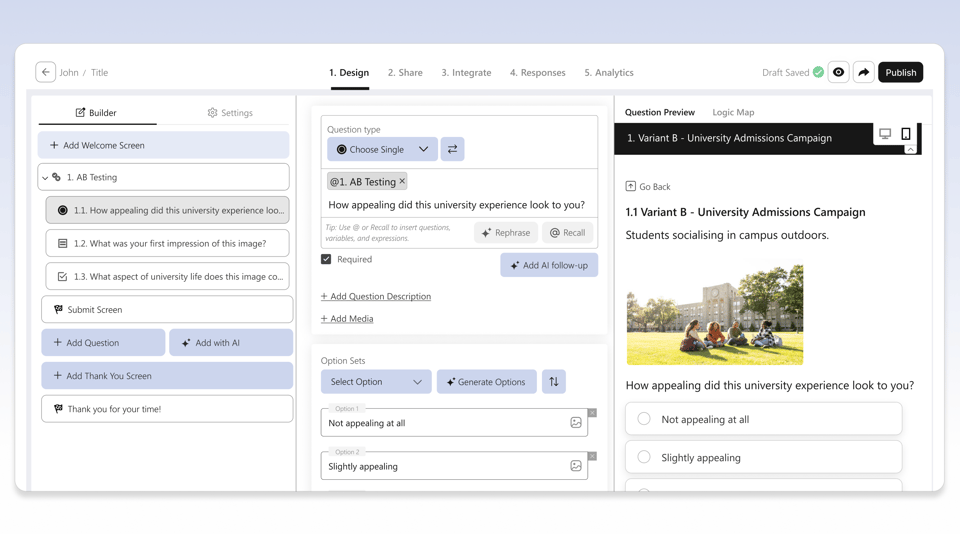
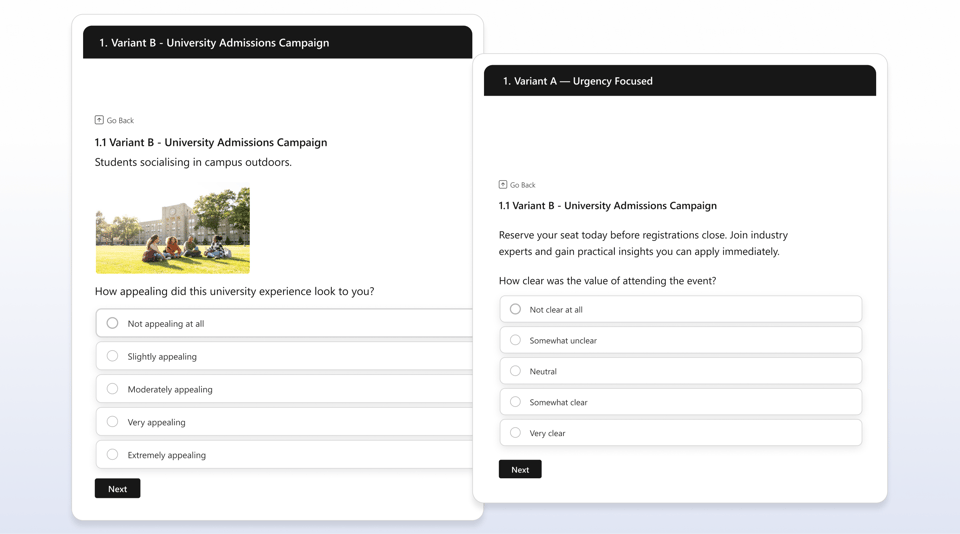

Run a split test on taglines, CTAs, or product descriptions before a campaign goes live. Show each variant to a real audience segment, follow up with reaction questions, and pick the version that performs — not the one that feels right in the meeting room.

The way a question is phrased changes how people answer it. UX researchers use Question Text A/B testing to measure how different framings affect responses, catching bias before it skews your findings.

Show different stimuli to different participant groups without exposing them to both versions. Each participant sees one variant, responses are tagged automatically, and the comparison is built into the results — no post-hoc data cleaning needed.

Test how different ways of describing a feature land with your target audience. Run a Text A/B test, follow up with comprehension and appeal questions, and go to market with the messaging that actually works.

Before launching your NFT collection, test which artwork, name, or concept resonates most with your community. Show different variants to your audience, collect their reactions, and drop the version that generates the strongest response, not the one that looks best in the team chat.

Before setting your pricing page live, test how different ways of presenting the same price land with buyers. 'Save 40%' vs 'Get 2 months free', the numbers are identical but the reaction isn't. A/B test the framing, measure purchase intent, and lead with what actually moves people.
Start free. Upgrade when your research outgrows it. Every plan keeps end-to-end encryption and full data ownership.
$49$39/mo
Unlimited surveys with AI-powered creation, end-to-end encryption, and core privacy protections.
$99$79/mo
Everything in Standard, plus AI follow-up questions, custom branding, audience management, and custom survey links.
$149$119/mofor 3 users
Everything in Premium, plus AI data analysis, market research question types, campaigns, and compliance essentials.
Let’s Talk
For organizations that need scale, security, SSO, white-label control, and personalized onboarding.
Discover how a Pricing Sensitivity A/B Test Survey can help you optimize your pricing strategy and maximize profits. Our comprehensive survey analyzes customer preferences and willingness to pay, allowing you to make data-driven decisions. Learn how to conduct a successful A/B test and interpret the results effectively. Take the guesswork out of pricing and start increasing your revenue today.
Discover the power of A/B testing in package design with our comprehensive survey. Compare different designs to see which one resonates best with your target audience. Our Package Design A/B Test Survey provides valuable insights to help you make informed decisions and optimize your packaging for maximum impact. Don't leave your design to chance – test it with us today!
Discover the power of Ad Copy A/B Testing with our comprehensive survey. Learn how to optimize your ad campaigns, increase click-through rates, and maximize ROI. Get actionable insights and data-driven strategies to take your marketing efforts to the next level. Don't miss out on this opportunity to revolutionize your advertising approach. Start A/B testing your ad copy today for better results tomorrow.
Looking to test out new product ideas? Our Product Concept AB Testing Survey is the tool allows you to gather valuable feedback and insights from potential customers to refine and improve your concepts. With easy-to-use features and customizable surveys, you can make informed decisions about which products to move forward with. Try our Product Concept Tester today and streamline your product development process!
Take the guesswork out of stimulus comparison with our Test Survey. Get valuable insights on different stimuli and their impact on your audience. This mock-up behavioural science study examining whether the framing of a health risk message affects a participant's intention to change behaviour. Conducted by a public health research team. Two versions of a health warning message about sedentary behaviour one uses loss framing (what you lose by not acting), the other uses gain framing (what you gain by acting). Classic Kahneman & Tversky experiment design.
Discover the latest trends in NFT collections through our A/B testing survey. Dive deep into the world of non-fungible tokens and see how different designs and concepts are resonating with collectors. Get insights on what makes an NFT collection successful and how to optimize your own. Stay ahead of the curve and make informed decisions in this rapidly evolving digital art market.
Join 500+ happy customers worldwide who are already using our amazing product.
This platform goes far beyond basic surveys. I’ve used it for lead generation, landing page enrichment, and even embedded videos. Everything’s easy to use, well documented, and super flexible—whether you're building forms, quizzes, or something more advanced.
 Martin G.Créateur de la Méthode Rashōmon
I think BlockSurvey is good for short and long surveys. What I find the best is the fact that there are so many templates I can use and customize.
 Ankit M.AI Analyst Team Lead
Uses end-to-end encryption technology that allows users to create survey forms where data is secure and private. UI looks very beautiful.
 Lou F.Creative Visionary
From end-to-end encryption-level security and AI-generated questions to powerful logic flows and white-label domains, BlockSurvey has it all. It’s secure, innovative, and packed with features like calculations, templates, and in-app analytics. I use it to create personalized assessments for leadership training—nothing else compares.
 Kim B.Founder/ President - International Leadership Trainer
BlockSurvey puts privacy and security above anything else. The use of end-to-end encryption is not a gimmick as in many products; it's a core feature enabling privacy and security. The survey building tools are impeccable. I've used numerous SaaS survey tools, and nothing comes close.
 Trevor L.Chief Information Security Officer (CISO)
Big fan of BlockSurvey and what Wilson and the team are doing. BlockSurvey was the end-to-end encrypted product I signed up for and I love the UI, privacy, responsiveness, and transparency behind the platform. Great job all 'round and awesome to see it keep evolving.
 James Longley@jameslongley
Few tools combine data confidentiality and form aesthetics like this one. The conversational design improved my response rate by 43%, and the webhook integrations made syncing to our CRM effortless. I also love how responsive and community-driven the support team is.
 Kris R.Group Automation Manager
Creating surveys with BlockSurvey has been a breeze. The drag-and-drop interface is intuitive, and we’re able to collect data anonymously and securely—without intermediaries. It’s interactive, friendly, and encourages high participation while protecting user privacy. The reports are solid, and we’ve used it confidently for internal and external feedback.
 Liz D.IT Support Specialist
For our NGO, data privacy is everything—and this platform nails it. It keeps personal info fully protected while letting us design beautiful, chat-like surveys that increase engagement. Team collaboration features sealed the deal.
 Luis Noel D.Director Comercial
Using BlockSurvey to protect their respondents' privacy, increase their survey completion rates, get better community feedback, and build better organizations.
Join 500+ companies across 50+ countries who use BlockSurvey to make decisions backed by real respondent data.