.svg)


Join Leading Brands across 50+ countries
Using BlockSurvey to protect their respondents' privacy, increase their survey completion rates, get better community feedback, and build better organizations.

BlockSurvey's AI conversational surveys collect customer satisfaction, product feedback, and user research from your SaaS users in a format that feels native to your product, not bolted on. One question at a time. Adapts to every response. Completion rates that make your data actually usable.
Trusted by leading brands for secure, privacy-first surveys







74%
74% of SaaS users abandon surveys that take more than 3 minutes to complete. Conversational surveys reduce perceived length by up to 40%. Most survey tools feel like they were designed for market research agencies, not SaaS products. BlockSurvey's conversational AI format (one question at a time, adapting in real time) matches the UX standard your users expect from your product. Higher completion. Less abandonment. Better data.
3x
3x higher NPS response rates when surveys are conversational versus traditional form-based. An NPS detractor gets a different follow-up than a promoter. A churned user gets probed on what broke the experience. A power user gets asked what they want next. BlockSurvey's AI adaptive questioning surfaces the context behind every score, without you having to build a single branching logic rule.
89%
89% of SaaS companies that regularly collect user feedback grow faster than those that don't, because decisions are made on signal, not assumption. SaaS user data is a competitive asset. BlockSurvey's end-to-end encryption means your customer feedback, satisfaction scores, and product insights are encrypted from submission to analysis. No third-party advertising platforms, no analytics trackers on survey pages. Your users' responses belong to you, not to your survey vendor.
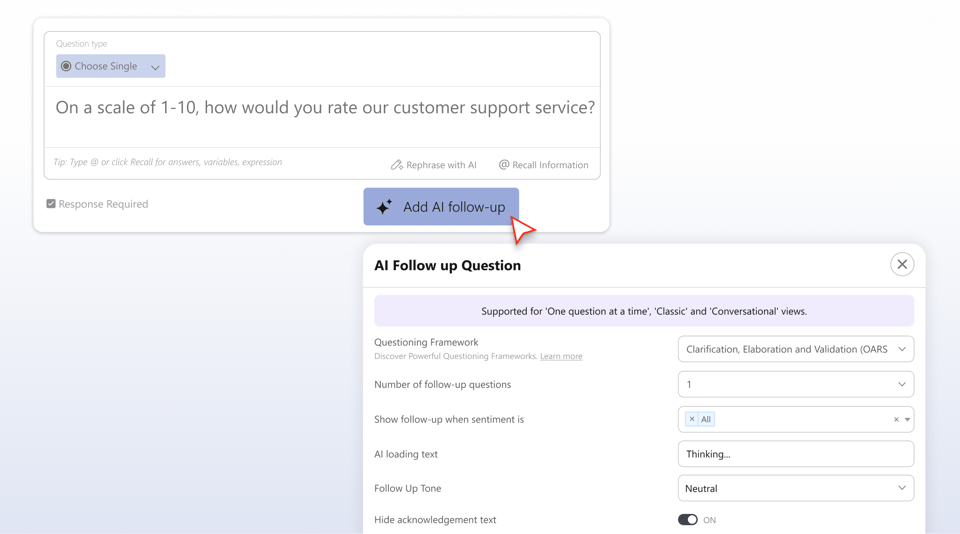

Survey users immediately after they interact with a new feature, in-product, while the experience is fresh. AI adaptive follow-up questions surface what worked, what confused them, and what they expected instead. Ship with confidence. Iterate with evidence. Stop building features users don't want.

Trigger an AI conversational survey the moment a user cancels or downgrades. Adaptive follow-up questions probe the real reason: pricing, missing feature, switching to a competitor, or a support failure. Churn surveys are the highest-signal data source you have. Most teams ignore them because the response rates are too low. BlockSurvey's conversational format changes that.

Run quarterly NPS surveys across your entire user base. Segment results by plan type, industry, or product usage. AI follow-up questions surface why detractors are unhappy before they churn, and why promoters love you so you can double down. Your CSMs spend time acting on insights, not chasing survey responses.

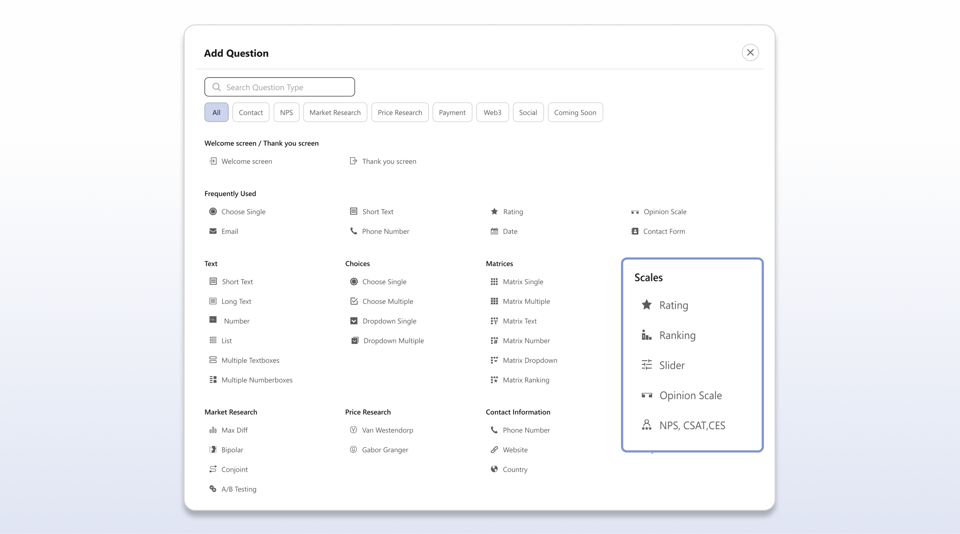
Use A/B testing surveys to validate which messaging, value propositions, or CTAs resonate with your target users before committing to a campaign. Show variant A to one group, variant B to another, measure reaction, comprehension, and appeal. Make conversion rate optimization decisions with user signal, not gut feel.

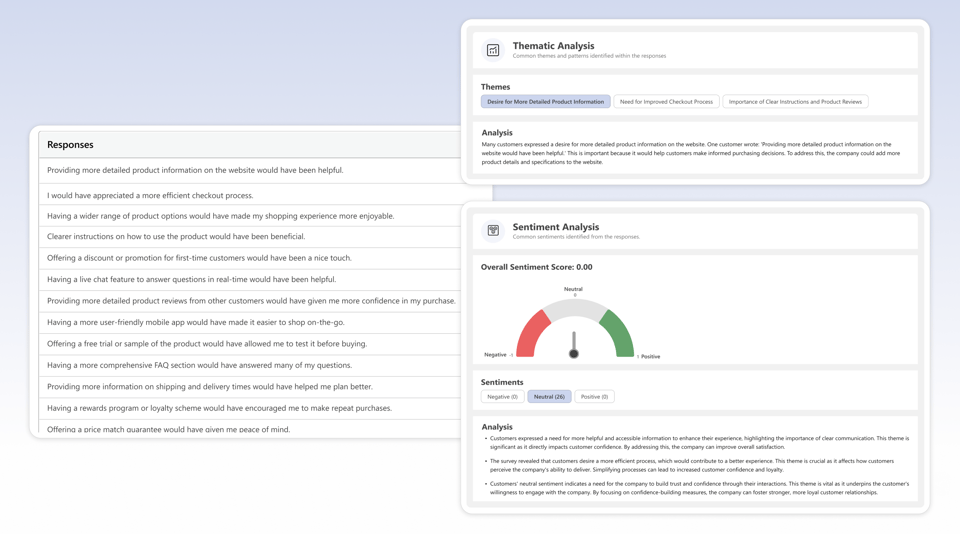
Run post-session usability surveys after key product flows: onboarding, checkout, setup, upgrade. BlockSurvey's conversational format reduces the cognitive load of post-task surveys, improving completion and response quality. AI thematic analysis groups qualitative UX feedback into patterns your design team can act on immediately.

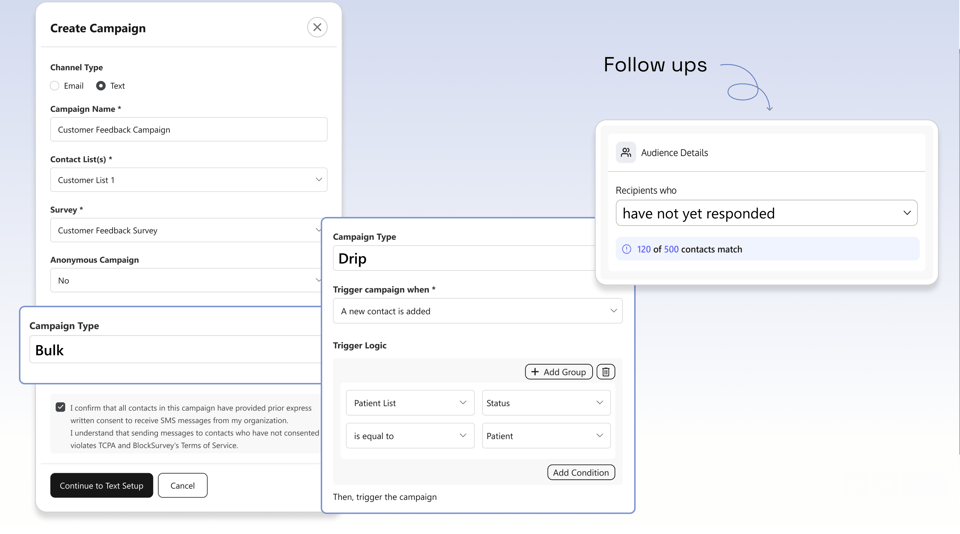
Survey new users at day 7, day 30, and day 90 of onboarding with automated drip campaigns. AI adaptive questioning identifies where users are getting stuck, before they go quiet and before they churn. Each response is tagged to the user's onboarding stage so you can see exactly where the friction is in your activation flow.
Start free. Upgrade when your research outgrows it. Every plan keeps end-to-end encryption and full data ownership.
$49$39/mo
Unlimited surveys with AI-powered creation, end-to-end encryption, and core privacy protections.
$99$79/mo
Everything in Standard, plus AI follow-up questions, custom branding, audience management, and custom survey links.
$149$119/mofor 3 users
Everything in Premium, plus AI data analysis, market research question types, campaigns, and compliance essentials.
Let’s Talk
For organizations that need scale, security, SSO, white-label control, and personalized onboarding.
Join 500+ happy customers worldwide who are already using our amazing product.
This platform goes far beyond basic surveys. I’ve used it for lead generation, landing page enrichment, and even embedded videos. Everything’s easy to use, well documented, and super flexible—whether you're building forms, quizzes, or something more advanced.
 Martin G.Créateur de la Méthode Rashōmon
I think BlockSurvey is good for short and long surveys. What I find the best is the fact that there are so many templates I can use and customize.
 Ankit M.AI Analyst Team Lead
Uses end-to-end encryption technology that allows users to create survey forms where data is secure and private. UI looks very beautiful.
 Lou F.Creative Visionary
From end-to-end encryption-level security and AI-generated questions to powerful logic flows and white-label domains, BlockSurvey has it all. It’s secure, innovative, and packed with features like calculations, templates, and in-app analytics. I use it to create personalized assessments for leadership training—nothing else compares.
 Kim B.Founder/ President - International Leadership Trainer
BlockSurvey puts privacy and security above anything else. The use of end-to-end encryption is not a gimmick as in many products; it's a core feature enabling privacy and security. The survey building tools are impeccable. I've used numerous SaaS survey tools, and nothing comes close.
 Trevor L.Chief Information Security Officer (CISO)
Big fan of BlockSurvey and what Wilson and the team are doing. BlockSurvey was the end-to-end encrypted product I signed up for and I love the UI, privacy, responsiveness, and transparency behind the platform. Great job all 'round and awesome to see it keep evolving.
 James Longley@jameslongley
Few tools combine data confidentiality and form aesthetics like this one. The conversational design improved my response rate by 43%, and the webhook integrations made syncing to our CRM effortless. I also love how responsive and community-driven the support team is.
 Kris R.Group Automation Manager
Creating surveys with BlockSurvey has been a breeze. The drag-and-drop interface is intuitive, and we’re able to collect data anonymously and securely—without intermediaries. It’s interactive, friendly, and encourages high participation while protecting user privacy. The reports are solid, and we’ve used it confidently for internal and external feedback.
 Liz D.IT Support Specialist
For our NGO, data privacy is everything—and this platform nails it. It keeps personal info fully protected while letting us design beautiful, chat-like surveys that increase engagement. Team collaboration features sealed the deal.
 Luis Noel D.Director Comercial
Using BlockSurvey to protect their respondents' privacy, increase their survey completion rates, get better community feedback, and build better organizations.
Join 500+ companies across 50+ countries who use BlockSurvey to collect honest, actionable feedback from the users who drive their SaaS growth.