.svg)


Join Leading Brands across 50+ countries
Using BlockSurvey to protect their respondents' privacy, increase their survey completion rates, get better community feedback, and build better organizations.

Every customer experience ends in one of two places: your feedback station or your Google reviews. Capture feedback on-site the moment an experience ends, or find out what went wrong from a public review you cannot undo. BlockSurvey's kiosk surveys turn any tablet into a feedback station for retail floors, hotel lobbies, and event venues. No email. No app. No missed moments.
Trusted by leading brands for secure, privacy-first surveys







10x
10x higher response rate for on-site kiosk surveys vs. email. It reaches every person who walks in, not just the fraction who checks email.

88% read reviews before visiting; one bad review can drive away 22% of customers. An on-site kiosk surfaces problems while the customer's still there.

Feedback collected 30 seconds after an experience captures detail an email response three days later loses entirely. On-site kiosk feedback stays raw and accurate.
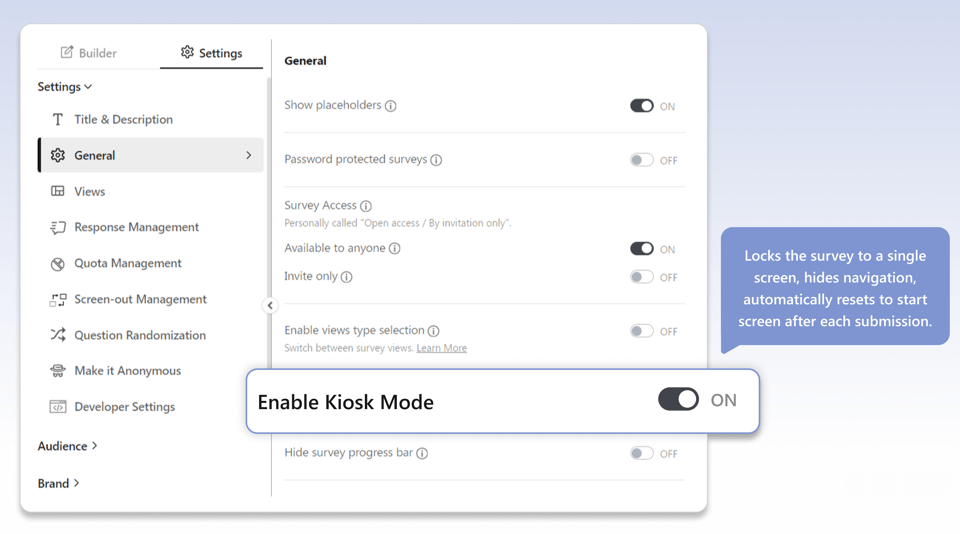
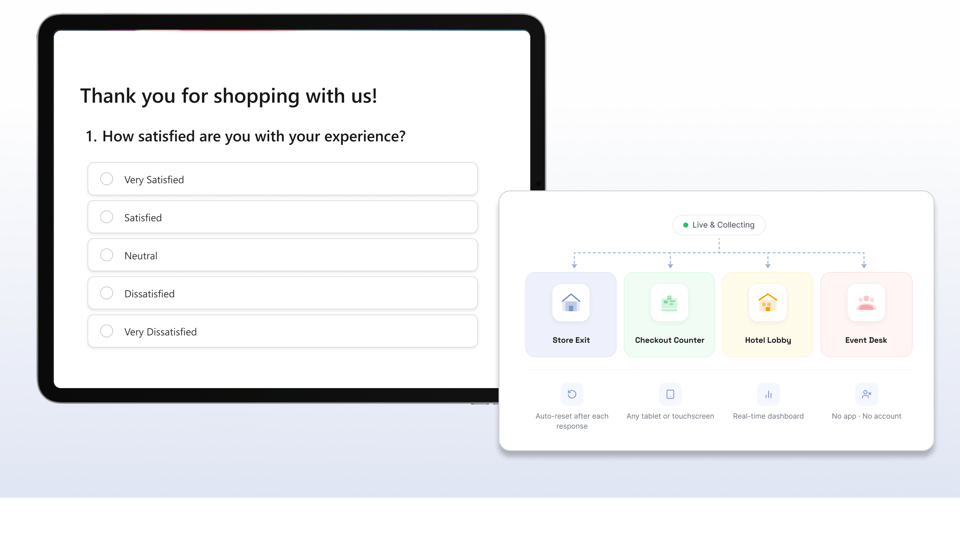
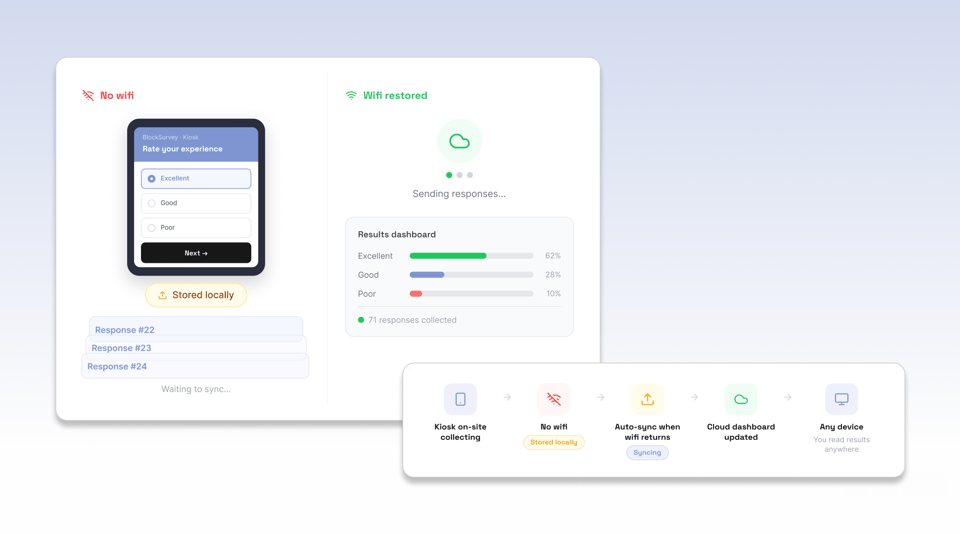

A tablet at the store exit captures the shopping experience while it is fresh. Customers rate their visit, flag a stockout, or report a service issue in two taps before they leave. Store managers see negative feedback in real time and can act before the customer gets home and leaves a review. On-site feedback creates a chance to recover the customer before they leave.

A kiosk in the hotel lobby or at checkout collects guest feedback at the moment of departure, when the experience is complete and the memory is sharp. Guests who would never open a follow-up email tap a quick rating on their way out. Hospitality teams catch service issues while the guest relationship can still be repaired.

Email surveys sent after an event reach attendees who have already moved on. A kiosk on the event floor or at the exit captures feedback while attendees are still in the experience. Rate a session, flag a logistics issue, or score the overall event in seconds. Event organizers collect representative feedback before the venue empties.

A small tablet at the counter or by the exit captures the dining experience while the customer is still there. Diners rate the food, the service, and the atmosphere before they leave. Restaurant managers see a low score immediately and can address it with the table that is still seated, rather than reading about it in a review the next morning.

A kiosk at a pop-up shop or trade show booth collects visitor feedback and captures leads at the same time. Visitors rate the product, share their reaction, and optionally leave a contact detail for follow-up. Every interaction at the booth becomes data, even when staff are busy with other visitors.

Museums, parks, attractions, and public venues use exit kiosks to measure visitor satisfaction at scale. A tablet at the exit captures the experience from every visitor type, including those who would never respond to a digital follow-up. Venue operators get continuous, representative feedback on the visitor experience without adding staff.
Start free. Upgrade when your research outgrows it. Every plan keeps end-to-end encryption and full data ownership.
$49$39/mo
Unlimited surveys with AI-powered creation, end-to-end encryption, and core privacy protections.
$99$79/mo
Everything in Standard, plus AI follow-up questions, custom branding, audience management, and custom survey links.
$149$119/mofor 3 users
Everything in Premium, plus AI data analysis, market research question types, campaigns, and compliance essentials.
Let’s Talk
For organizations that need scale, security, SSO, white-label control, and personalized onboarding.
Join 500+ happy customers worldwide who are already using our amazing product.
This platform goes far beyond basic surveys. I’ve used it for lead generation, landing page enrichment, and even embedded videos. Everything’s easy to use, well documented, and super flexible—whether you're building forms, quizzes, or something more advanced.
 Martin G.Créateur de la Méthode Rashōmon
I think BlockSurvey is good for short and long surveys. What I find the best is the fact that there are so many templates I can use and customize.
 Ankit M.AI Analyst Team Lead
Uses end-to-end encryption technology that allows users to create survey forms where data is secure and private. UI looks very beautiful.
 Lou F.Creative Visionary
From end-to-end encryption-level security and AI-generated questions to powerful logic flows and white-label domains, BlockSurvey has it all. It’s secure, innovative, and packed with features like calculations, templates, and in-app analytics. I use it to create personalized assessments for leadership training—nothing else compares.
 Kim B.Founder/ President - International Leadership Trainer
BlockSurvey puts privacy and security above anything else. The use of end-to-end encryption is not a gimmick as in many products; it's a core feature enabling privacy and security. The survey building tools are impeccable. I've used numerous SaaS survey tools, and nothing comes close.
 Trevor L.Chief Information Security Officer (CISO)
Big fan of BlockSurvey and what Wilson and the team are doing. BlockSurvey was the end-to-end encrypted product I signed up for and I love the UI, privacy, responsiveness, and transparency behind the platform. Great job all 'round and awesome to see it keep evolving.
 James Longley@jameslongley
Few tools combine data confidentiality and form aesthetics like this one. The conversational design improved my response rate by 43%, and the webhook integrations made syncing to our CRM effortless. I also love how responsive and community-driven the support team is.
 Kris R.Group Automation Manager
Creating surveys with BlockSurvey has been a breeze. The drag-and-drop interface is intuitive, and we’re able to collect data anonymously and securely—without intermediaries. It’s interactive, friendly, and encourages high participation while protecting user privacy. The reports are solid, and we’ve used it confidently for internal and external feedback.
 Liz D.IT Support Specialist
For our NGO, data privacy is everything—and this platform nails it. It keeps personal info fully protected while letting us design beautiful, chat-like surveys that increase engagement. Team collaboration features sealed the deal.
 Luis Noel D.Director Comercial
Using BlockSurvey to protect their respondents' privacy, increase their survey completion rates, get better community feedback, and build better organizations.
Catch issues before they become public reviews. Set up your first kiosk survey in minutes and start collecting feedback while there's still time to act.