


.svg)



If privacy, AI-assisted survey creation, and white-labeling matter most, BlockSurvey is the better choice. JotForm suits teams that want a huge template library, and Microsoft Forms works best for quick, simple forms inside the Microsoft 365 ecosystem. Choosing a form-building tool for your business can be a hard call. This post compares JotForm, Microsoft Forms, and BlockSurvey so you can see how they differ.
Among form builders, JotForm and Microsoft Forms are two established options. Both have been around for a while and have their own features. BlockSurvey is the newer entrant.
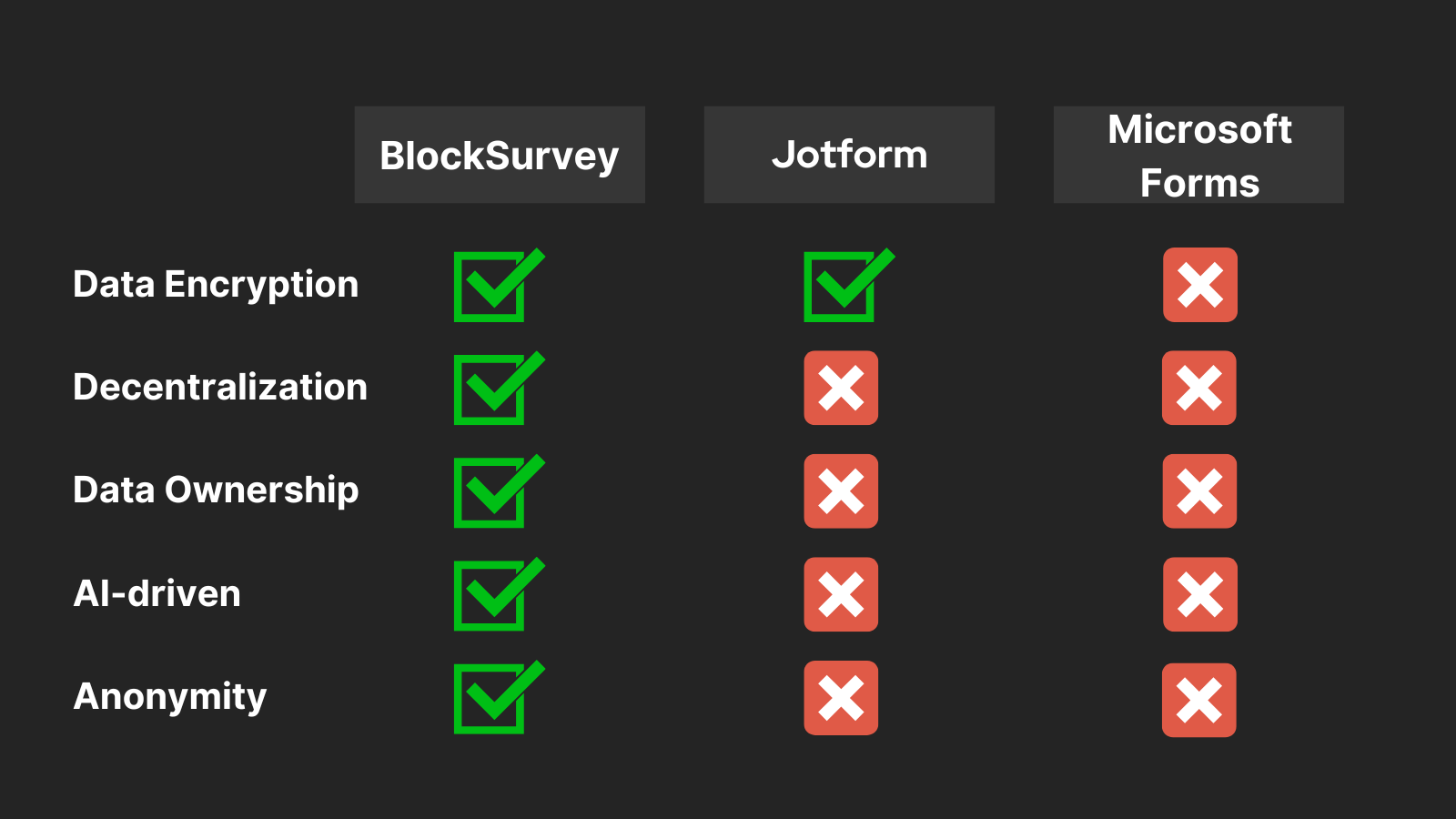
JotForm is known for its interface and its wide range of form elements. Microsoft Forms integrates within the Microsoft ecosystem, which is convenient for Office users. BlockSurvey focuses on privacy and control. Your data is encrypted end to end, and you hold the only keys, so not even BlockSurvey can read it. Here is how the three tools compare on the main features you look for in a survey platform.
Privacy
Jotform: Jotform uses encryption for data security. However, as a centralized service, data privacy depends on Jotform's controls and systems. You cannot have complete control over your data ownership.
Microsoft Forms: Microsoft Forms provides basic privacy measures, such as encryption and data storage compliance. However, data ownership and control are limited, since it operates within the Microsoft ecosystem.
BlockSurvey: BlockSurvey puts a strong emphasis on user privacy and data protection. BlockSurvey enables digital rights for users. This means the account or identity ownership and the data ownership stay with the user rather than the platform provider. With BlockSurvey, all your data is encrypted end to end and you hold the keys. This prevents data breaches, leaks, and harvesting trust issues, which tends to increase response rates. Wufoo, by contrast, does not offer the same level of data security.
AI-Driven Surveys
Jotform & Microsoft Forms: Neither Jotform nor Microsoft Forms offered AI-driven survey options.
BlockSurvey: Blocksurvey is the only online survey tool that uses AI to help create online surveys. If you need to make a survey but cannot settle on the right questions, Blocksurvey can help. Its AI-driven surveys can suggest questions based on your topic, which is useful when you are stuck for ideas. Let Blocksurvey handle the drafting and build the survey in less time.
White labeling
Jotform: With its paid plans, Jotform offers custom branding, so you can remove Jotform branding and add your own.
Microsoft Forms: Microsoft Forms falls short on advanced white-labeling options, which limits how far you can customize and brand your forms. Compared with its competitors, Microsoft Forms may not offer the flexibility you want for a cohesive brand experience.
BlockSurvey: BlockSurvey offers extensive white labeling options, letting users customize the design, branding, and user experience of their forms for a consistent brand identity. White labeling lets you create forms that match your brand's look and feel. Both Jotform and Typeform offer white labeling to match your brand. BlockSurvey goes a step further. You can customize your forms with your logo and branding, and you can do so without worrying about third-party access to your data.
Ease of Use
Jotform: Known for its drag-and-drop form builder, Jotform makes creating forms easy and intuitive. The interface is straightforward, and there is a large range of templates to choose from.
Microsoft Forms: Microsoft Forms has a straightforward interface that makes form creation and distribution simple. It is a good option if you have basic form needs and want simplicity. If you have more complex requirements or need advanced features, though, you may find Microsoft Forms limited for those specific needs.
BlockSurvey: BlockSurvey offers a clean, modern interface that makes form creation simple. Its design and easy-to-navigate features let users build forms quickly and efficiently.
Weighing just two of them? See our focused JotForm vs BlockSurvey comparison for a deeper look.
Conclusion
Among JotForm, Microsoft Forms, and BlockSurvey, BlockSurvey is the strongest form-building tool for teams that prioritize privacy. It combines strong privacy measures, AI capabilities, extensive white labeling options, and a straightforward interface, which suits modern business needs. It provides end-to-end encryption so your data stays private, even from us, along with AI-driven insights and customizable branding. If you want a tool that puts privacy, AI features, and ease of use together, BlockSurvey is a solid pick for data collection.
JotForm vs. Microsoft Forms vs. BlockSurvey - A Rapid, In-Depth Analysis for Easy Decision-Making! FAQ
Are there any limitations on form creation and response collection?
Can I integrate these platforms with other applications?
How secure is my data with JotForm, Microsoft Forms, or BlockSurvey?
How does BlockSurvey differentiate itself in terms of data privacy and anonymity compared to JotForm and Microsoft Forms?
What unique features does BlockSurvey offer that set it apart from JotForm and Microsoft Forms?
Get insights.
Unlock value.
- 14-day free trial
- Set up in minutes
- End-to-end encrypted