


.svg)



What you'll learn
By the end of this lesson, you'll be able to:
- Understand why survey length matters.
- Identify the right length for different types of surveys.
- Apply design strategies that make a survey feel shorter.
1. Why survey length matters
Length is one of the first things to get right when you build a survey.
Long surveys tire people out, and tired respondents rush their answers or stop caring. Each question you add raises the odds that someone quits partway through.
Shorter surveys tend to have higher completion rates, according to several completion-rate studies. You still have to weigh that against the depth of information you actually need.
Start from the purpose of the survey. Once you know what you are trying to find out, it is easier to decide which questions are essential and which ones you can cut. Every question should map to a specific goal.
Redundant or vague questions just make the survey longer without giving you anything useful.
A survey set at the right length lifts response rates, improves data quality, and gives you insights you can actually use when making decisions.
The working rule is simple: balance length against the depth of the questions you ask.
2. Optimal length of surveys
Different surveys do different jobs, so the right length depends on what the survey is for.
Short polls work well for quick feedback. They are fast to fill out and get high completion rates, which makes them handy when you need data in a hurry. Short polls usually run from 1 to 5 questions.
Customer feedback forms target customers and focus on a recent interaction. These are short to medium length, so 5 to 10 questions is a good range for collecting customer feedback.
Employee engagement surveys run inside an organization. They tend to be longer, around 10 to 15 questions, because they cover several parts of an employee's experience at work. These surveys should be anonymous so employees can answer honestly.
Research surveys go after deeper insight and lean on open-ended questions. Because they collect detailed data, they can run longer, often 15 to 20 questions or more.
| Survey Type | Ideal number of questions |
|---|---|
| Short polls | 1 - 5 |
| Customer Feedback Forms | 5 - 10 |
| Employee Engagement Surveys | 10 - 15 |
| Research Surveys | 15 - 20 and more |
With a sense of the right length for each survey type, you can set the question count next time you build one.
3. Survey design strategies to counteract length
A few design choices can make a survey feel shorter than it is.
3.1. Engaging visuals
Adding relevant images, infographics, or other visuals keeps respondents engaged. Visuals are not just decoration. They can explain a point and make a question easier to understand and answer.
3.2. Various question types
Mixing question types like multiple choice, sliders, checkboxes, and open text fields keeps the survey from feeling repetitive. That variety stops respondents from settling into a monotonous answering pattern, which cuts down on survey fatigue and rushed answers.
3.3. User interface
Clean layouts, clear fonts, and intuitive UI/UX can make a long survey feel short. Use white space in a balanced way so the survey does not look cluttered. You can also break up sections with different background colors or separators. When you use color for a section, match it to the survey's purpose.
3.4. Divided surveys
Splitting your survey into distinct sections is a reliable way to make a long survey feel shorter. Progress indicators help too, since they show respondents how much is left and keep them moving toward the end.
3.5. Time to complete
BlockSurvey shows Time to Complete on the welcome screen. This helps because respondents see the expected time before they even start. You can find the "Time to Complete" field in the screenshot below.
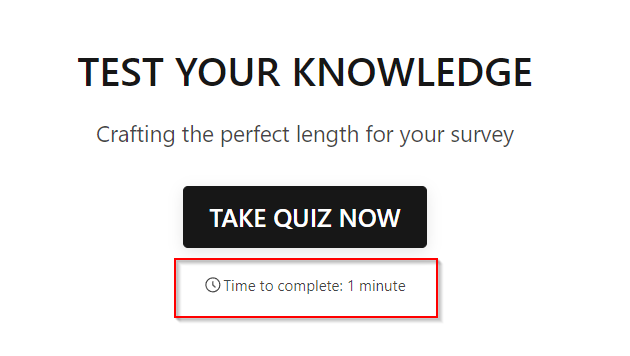
Crafting the Ideal Length for your survey
3.6. Average completion time
BlockSurvey lets you view the Average Completion Time in the response analytics. This number helps you build better surveys later by showing how long people actually spend. You can find the "Average Completion Time" field in the screenshot below.

3.7. Drop off analytics
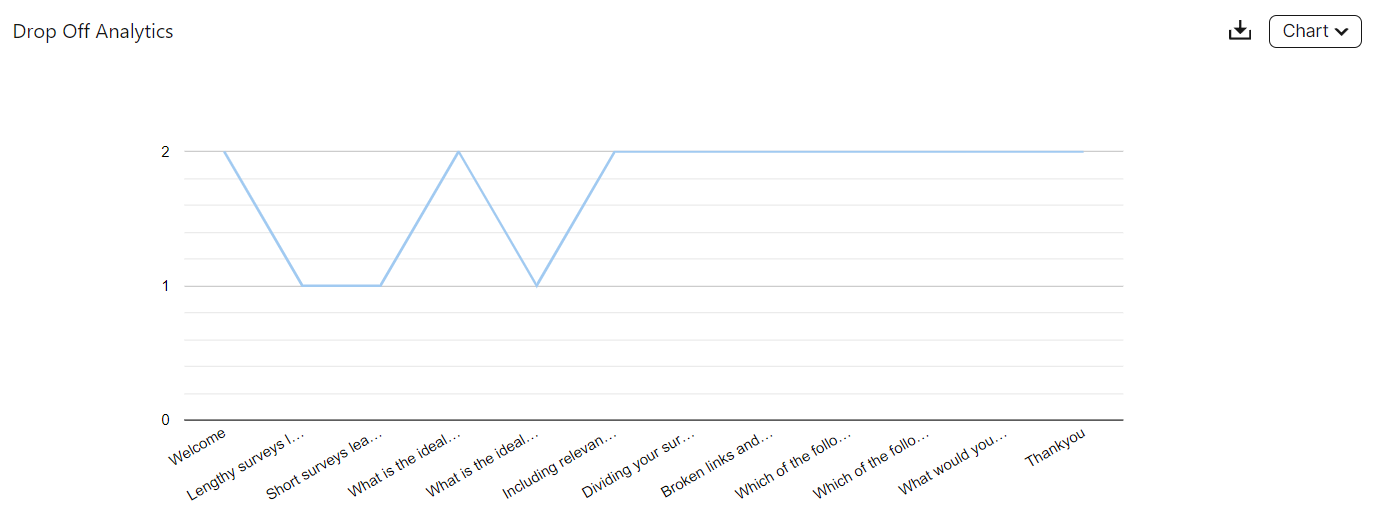
It helps to know which question causes the most drop-off. BlockSurvey Analytics includes a Drop Off Analytics feature. This chart shows exactly which question in the survey is losing respondents. Once you know that, you can avoid similar questions in future surveys, or edit and republish the current one. You can find the Drop Off Analytics screenshot below.
4. Technical considerations
4.1 Mobile optimization
More people take surveys on their phones than on desktops, so make sure your survey is mobile-optimized.
A survey that feels long on a desktop feels even longer on mobile when respondents have to keep scrolling.
4.2 Faster loading times
Few things lose respondents faster than a slow survey. Make sure your platform can handle multimedia elements without glitches or lag.
When you embed videos or high-resolution images, compress them so they load quickly while keeping their quality.
4.3 Ensure user experience
The experience should stay smooth from start to finish. Broken links, unresponsive buttons, or problems saving responses are frustrating and push people to quit.
Test your surveys regularly on different devices and browsers so they behave consistently.
5. Breaking complexity
Survey questions range from simple closed-ended ones, like multiple-choice, to open-ended ones that ask for a detailed answer. The first kind is quick to answer, while the second takes time to think through.
For instance, the question,
"Are you satisfied with our service?"
can be answered faster than the question,
"What improvements would you suggest for our service?".
Detailed answers are valuable, but it is worth deciding how much time you are really asking respondents to give.
If your survey is packed with open-ended questions, consider swapping some for quicker, closed-ended ones like rating scales. This breaks up the effort of answering and keeps participants from feeling overwhelmed.
6. Providing incentives
Do not underestimate incentives when you run a longer survey.
Research puts the average survey response rate somewhere between 10% and 30%. People hesitate to take surveys, and an incentive is often the nudge they need to finish. Offering one signals that you value the respondent's time.
An incentive tells respondents, "We value your time and opinion, and here is a small thank-you for your effort."
Long surveys ask for more time, so an incentive can be a strong way to encourage people to complete them.
Incentives range from monetary rewards like discounts and gift cards to non-monetary ones like entry into a prize draw or access to premium products.
Keep in mind that incentives can skew your results, especially when respondents rush through just to claim the reward. When you design the survey, add checks that help you spot genuine responses.
7. Feedback collection
Before you send a survey to a wide audience, test it with a small group. That group can tell you whether the survey feels too long or too hard. A pilot test also gives you an early estimate of the average completion time.
This feedback helps you land on the right length and raise the overall quality of the survey.
During the pilot test, add a short section at the end where participants can share their experience.
These questions tend to surface useful insight:
"Did you find this survey too long to complete?"
"Were there any questions you found redundant?"
"What specific suggestions do you have for improvement?"
"Is there anything else you would like to share about your experience?"
If several respondents flag a section as too long or too complex, fix it before the next round. Use the feedback to keep refining your surveys over time.
Test your knowledge
Key takeaways
- Keep the survey long enough to gather the data you need and short enough to keep respondents engaged.
- Engaging visuals make a long survey feel shorter.
- Incentives can encourage respondents to finish longer surveys.
Keep going: learn how to improve response rates, create more engaging surveys, and pick a survey template to get started.
Congratulations! You have completed this lesson.
Crafting the Ideal Length for your survey FAQ
What is the ideal length for a survey?
How long should my survey be to ensure participants' engagement?
Does the length of a survey affect the quality of the data collected?
Are there any guidelines for the number of questions in a survey?
Can I include more questions to gather extensive data?
Get insights.
Unlock value.
- 14-day free trial
- Set up in minutes
- End-to-end encrypted