


.svg)



What you'll learn
By the end of this lesson, you'll be able to:
- Understand why it matters to begin and end surveys well.
- Identify strategies for engaging survey openings.
- Identify strategies for genuine survey endings.
- Use BlockSurvey's Welcome and Thank You screen.
1. Why beginning and ending surveys well matters
How you open and close a survey sets the tone for the respondent's experience and shapes the impression they leave with. A clear introduction can grab the respondent's attention and make them more willing to continue.
Closing on a positive note, with a thank you message or a short recap of the survey's purpose, can leave a positive impression and make the respondent feel valued. That tends to produce higher response rates, better satisfaction, and more accurate data.
This lesson walks through how to design engaging openings and genuine endings, so your surveys collect better answers.
1. Have an engaging opening
A strong opening earns the reader's attention.
An engaging opening sparks the respondent's interest and gives them a reason to take part. It improves survey completion rates and sets clear expectations.
Here are a few ways to make the start of your survey more engaging.
1.1. Use a hook
A good hook opens your survey with an engaging question or statement.
The hook can be a question built around a scenario the respondent recognizes. It can be a thought-provoking question about a statistic. It can also be a simple question about how the respondent feels.
1.2. Convey purpose
Another common technique is to state the purpose behind the survey.
This answers the question, "Why should respondents take the survey?". When the purpose is clear, the respondent voices their opinion with more confidence and trust.
1.3. Use a progress indicator
A progress indicator at the start of the survey gives the respondent the full picture.
The progress indicator shows how much of the survey is left. Showing progress reduces the uncertainty and frustration that leads to survey drop-off.
It also signals the time and effort a survey takes, which leads to more thoughtful responses.
1.4. Mention incentives
The welcome screen is a good place to mention incentives.
Naming an incentive at the start of the survey creates immediate interest.
Disclosing the incentive early keeps respondents informed, which lifts engagement and completion rates. It also builds trust and appreciation, which brings out more honest responses.
The opening is only half of it. The ending matters just as much.
The next section covers how to close a survey well.
2. Have a genuine ending
A survey needs a real close, not an abrupt stop.
There are a few good ways to say goodbye in a survey. A genuine ending builds trust and strengthens the respondent's sense of belonging.
You can express gratitude, share the next steps, ask for feedback, or reaffirm anonymity. Each of these is covered below.
2.1. Express gratitude
Acknowledge that your respondents made a real contribution to the survey.
One way to do that is a genuine thank you. Expressing gratitude honestly improves trust and confidence.
BlockSurvey lets you set and customize the thank you screen.
2.2. Share next steps
Once respondents finish the survey, they may wonder what to do next.
Answering the questions below gives them better closure and keeps them informed about what comes next.
- Will there be follow-ups?
- When and how will results be shared?
2.3. Receive feedback
A simple open-ended question like "Do you have any feedback on the survey?" is enough to get honest feedback in the respondents' own words.
It signals that you genuinely want the participant's view of the survey.
That feedback helps improve the quality of future surveys. It can also surface details about your survey you would otherwise miss.
2.4. Reiterate anonymity
If your survey collects sensitive or personal information, the final screen (and the welcome screen) can serve as a reminder that responses are anonymous or confidential. Repeating this builds trust and reassures respondents.
BlockSurvey is a secure, privacy-focused, end-to-end encrypted survey platform that takes privacy and anonymity very seriously.
You now know how to start and end on a high note. The start and end are only part of the survey.
Next, here is how to keep momentum through the middle.
3. Keep the momentum in the middle of the survey
The points below cover how to keep momentum in the middle of the survey.
- Present the easier questions first and the harder questions later.
- Don't overburden a respondent by asking complex questions one after another.
- Use logic to skip questions that are irrelevant to a respondent and avoid fatigue.
- Avoid technical jargon and use simple language in surveys.
- Order your survey questions from start to end in a logical sequence.
- Use images and pictures to improve the visual appeal of your survey.
The next sections cover BlockSurvey's "Welcome" and "Thank You" screens.
4. How to use the BlockSurvey Welcome screen
The BlockSurvey "Welcome" screen settings give you room to customize. They help you start your survey on a high note.
Below is a screenshot of BlockSurvey's Welcome screen settings.
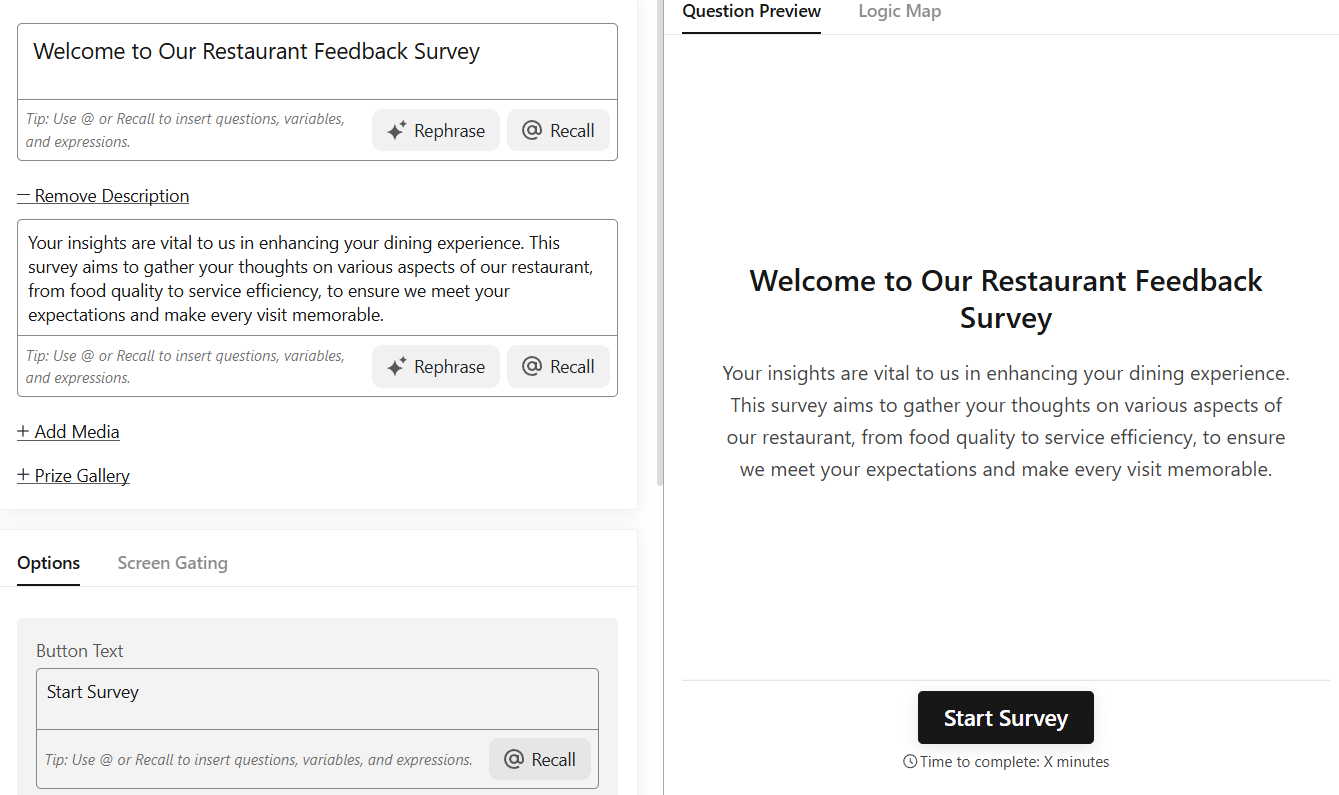
BlockSurvey gives you the options below to customize your welcome screen.
Heading: An input field to enter the heading for your survey. 'BlockSurvey Academy' is the heading in the screenshot.
Description: You can write a description below the heading. It shows in a smaller font size below the heading.
Button: You can customize the text on the button.
Screen layout: The screen layout has 3 options (Left, Center, Right). This aligns the screen's content to the left, center, or right.
Timer: The timer option lets you set a fixed time to complete the survey. When the timer runs out, the survey is auto-submitted.
Time to complete: This option displays the approximate time required to complete the survey. The label is customizable.
5. How to use the BlockSurvey Thank You screen
BlockSurvey gives you a full set of options to customize your thank you screen, so you can end with purpose and style.
Below is a screenshot of the thank you screen.
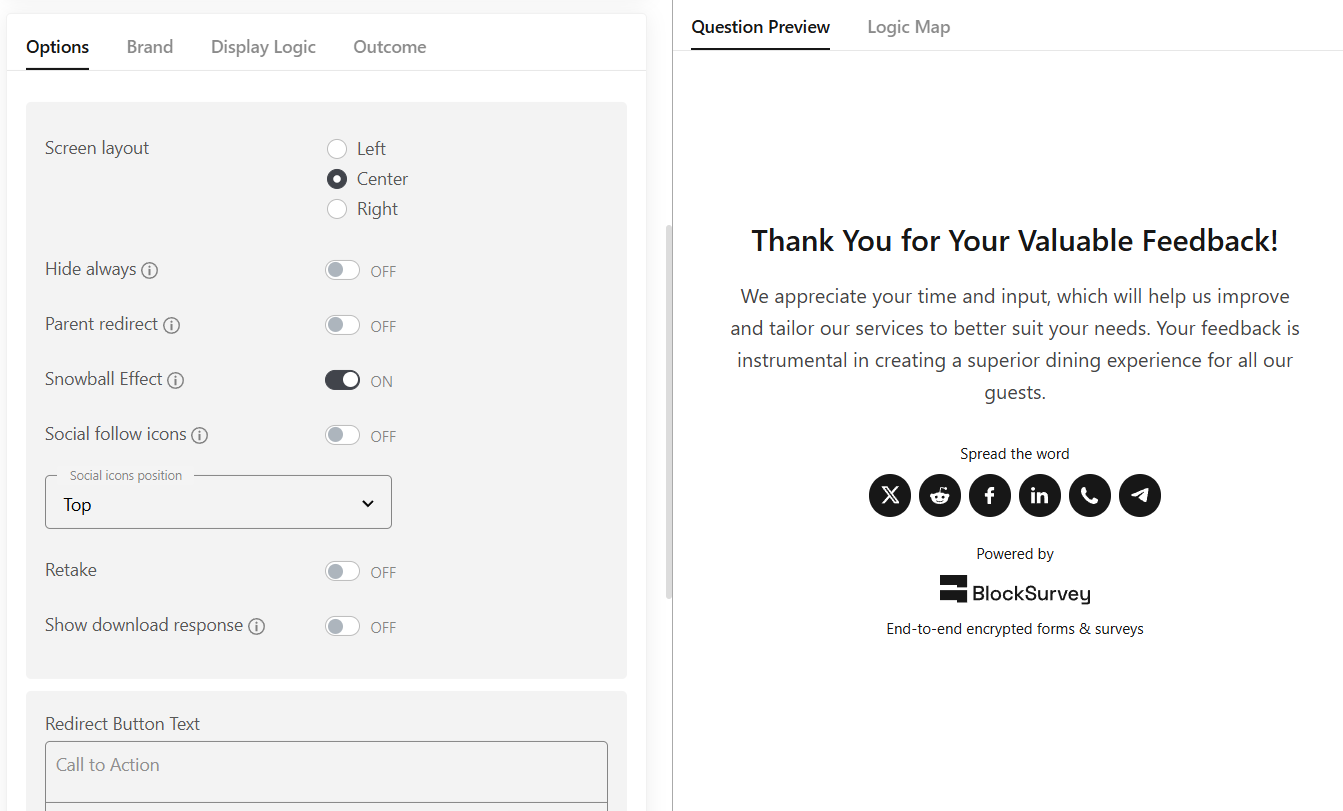
You can customize the heading and description on the thank you screen.
There is an option to provide a call to action with a hyperlink.
As with the welcome screen, there is an option for text alignment.
You can include social sharing icons and social follow icons.
You can turn on the retake option so respondents can retake surveys.
You can upload your logo. You can also remove the powered by BlockSurvey logo.
You can display customized messages based on the survey outcome on the thank you screen.
Test your knowledge
Key takeaways
- Starting and ending surveys correctly leaves a positive impression.
- Mention the incentive at the start of the survey to create interest.
- Share next steps while ending the survey.
- Avoid overburdening respondents with complex questions.
Continue learning: discover how to create engaging surveys, get tips to increase your response rates, and start from a survey template.
Congratulations! You have completed this lesson.
How to Begin and End a Survey on High? FAQ
What does it mean to begin and end surveys on a high?
Why is it important to begin and end surveys on a high?
What type of questions should be used at the beginning of a survey?
How should a survey end on a high note?
Can the order of questions affect the quality of responses?
Get insights.
Unlock value.
- 14-day free trial
- Set up in minutes
- End-to-end encrypted