


.svg)



What You'll Learn
By the end of this lesson, you'll be able to:
- Explain what anonymity is and why it matters.
- Use BlockSurvey's Anonymous Seal to confirm survey data stays anonymous.
- Follow a few precautions that help respondents protect their own privacy.
1. What Is Anonymity?
The word anonymous comes from the Greek anonumos ('an' means without, 'onuma' means name). So anonymous means 'without a name'. Put another way, it means 'without revealing personal identity'.
In surveys, "anonymous" refers to the option to stay unidentified or untraceable while answering. When a respondent chooses to stay anonymous, personal information such as name, email address, or IP address is not collected. Their responses and their identity are both protected. Anonymous surveys tend to encourage honest, open answers, because respondents feel more comfortable sharing opinions without fear of repercussions or identification.
People keep finding new ways to protect the anonymity of survey respondents.
2. Why Is Anonymity Important?
Respondents want to stay anonymous when they take surveys. They do not want to be punished for answering honestly.
Making your surveys genuinely anonymous has several benefits.
- Builds trust between the survey owner and the respondent.
- Respondents are more likely to give honest answers.
- Leads to higher response rates.
- Leads to more accurate and reliable data.
- Keeps you compliant with ethical and legal standards.
- Reduces the number of biased or socially acceptable answers.
So it matters that respondents' surveys are anonymous.
But how does a respondent actually know a survey is anonymous?
One answer is an 'Anonymous Seal.'
The next section covers it.
3. Know the Anonymous Seal
3.1. Why Anonymous Seal?
BlockSurvey takes privacy seriously and wants survey data to stay safe and anonymous.
The 'Anonymous Seal' or 'Anonymous Badge' tells respondents that their survey is anonymous.
A few reasons we added the Anonymous Seal to BlockSurvey:
- Respondents are not left guessing about a survey's anonymity.
- Respondents do not have to check each question for anonymity by hand.
- Respondents can be confident that their answers stay anonymous.
Here is how to use the Anonymous Seal.
3.2. Identify the Seal
Below is a screenshot showing the 'Anonymous Seal'.
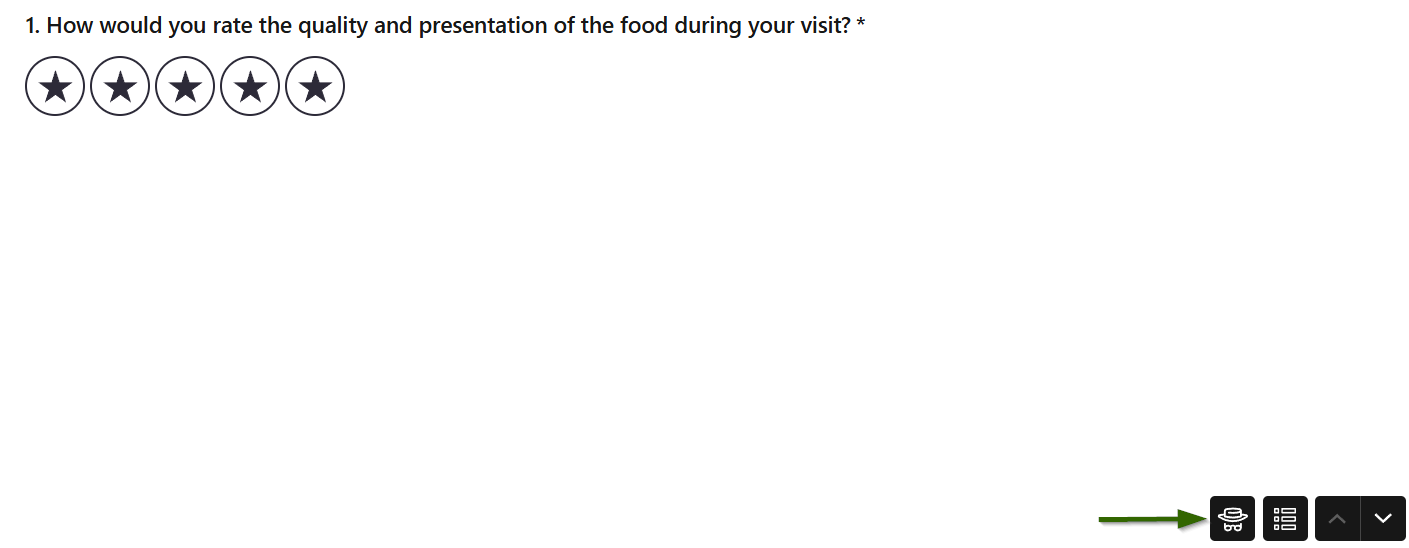
The Anonymous Seal is marked with an arrow. This is how it appears in a survey. The seal looks like a detective.
The next section shows how to enable it.
3.3. Enable the Seal
The Anonymous Seal shows up only when you enable it in Settings.
Here are the steps to enable it.
- Open the survey builder.
- Go to Settings.
- Select the 'Make it Anonymous' tab.
- Turn on the toggle.
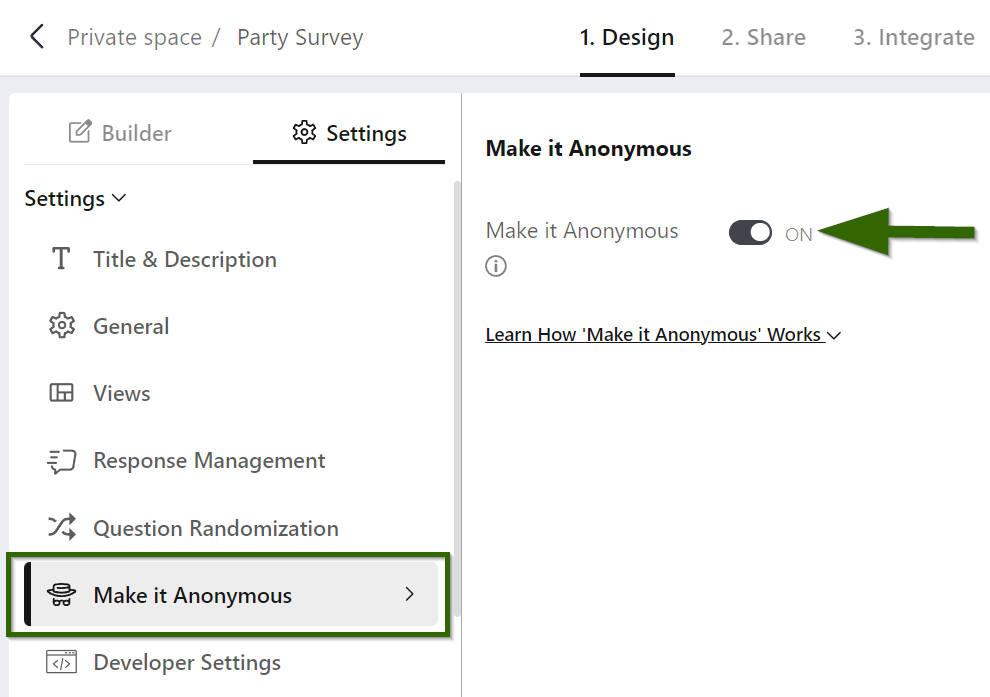
Your Anonymous Seal is now ready to display in the survey.
Even after you turn the toggle on, it switches off automatically when certain eligibility requirements are not met.
A few eligibility factors keep the seal in place.
The next section walks through them.
4. Eligibility For Anonymous Seal
The 2 eligibility factors for enabling the Anonymous Seal are listed below.
- Avoid PII
- Avoid URL data
4.1. Avoid PII
PII means Personally Identifiable Information. If your survey collects PII, it is not anonymous. The Anonymous Seal turns off automatically when a survey collects PII.
In BlockSurvey, the question types below are treated as revealing PII.
- Phone number
- Website
- Country
- Contact Form
- Payment
- Signature
The crypto question types below also count as PII.
- Stacks Network
- Solana Network
- Ethereum Network
When any of these question types appear in the survey, the builder turns the seal off.
Remove those question types to bring the seal back.
4.2. Avoid URL data
Web servers usually collect data passed through URLs for purposes like web analytics, marketing, research, and user experience.
In BlockSurvey, URL data is collected for survey personalization.
When the Anonymous Seal is enabled, though, BlockSurvey does not collect variable data passed through URLs. That URL data collection stops.
This is the second eligibility factor for setting the Anonymous Seal in BlockSurvey.
5. Caution For Respondents
The Anonymous Seal tells respondents the survey is anonymous, but respondents can still keep a few precautions in mind to protect themselves.
-
Avoid providing identifiable information.
Respondents should watch what they share. PII-revealing question types are removed from an anonymous survey, but respondents can still type a name, email address, or phone number into a short text field, so they should avoid doing that.
-
Understand the scope of anonymity.
Respondents should read the survey's introductory note carefully if there is one, and agree to take the survey only after reading its scope. They should know how the data will be shared and used later.
-
Be careful with open-ended responses.
In open-ended questions, respondents can include personal information without meaning to. Frame answers so that the respondent's identity stays non-identifiable and secure.
-
Be mindful of indirect identifiers.
Even when respondents provide no directly identifying data, an answer can sometimes be linked back to a person when combined with other data.
Respondents should be careful about sharing detailed information that could reveal their identity indirectly.
-
Check your responses before submission.
Respondents should review their answers before submitting to make sure they did not include any personal information by mistake.
6. How to verify Anonymous Surveys?
If you are unsure whether a survey is anonymous, there are a few ways to check. This applies to any survey platform.
To confirm that a survey is anonymous, you can take the following steps.
- Copy the survey link into a private browser window and open the form without signing into your account. If you can open it without signing in, the survey is likely anonymous.
- If the survey is anonymous, it usually says so near the top or bottom of the form. That signal can be something like the Anonymous Seal in BlockSurvey. The survey maker cannot remove it while the survey stays anonymous.
- When a survey asks you to sign an NDA (nondisclosure agreement) or requests personal information, that raises questions about how anonymous it really is. Be cautious with such surveys and weigh what it means to hand over personal information.
Test Your Knowledge
Key Takeaways
- Anonymity means staying unidentified while responding to a survey.
- Respondents are more likely to answer honestly on anonymous surveys.
- The Anonymous Seal signals to respondents that a survey is anonymous.
Want to go deeper? Explore how anonymous surveys work in BlockSurvey, learn how anonymity drives honest responses, and see the features that protect your respondents.
Congratulations! You have completed this lesson.
How to Create an Anonymous Seal? FAQ
What is an anonymous seal in surveys?
Does using an anonymous seal compromise the credibility of survey results?
Can an anonymous seal be used in any type of survey?
Is it necessary to inform survey respondents about the use of an anonymous seal?
Get insights.
Unlock value.
- 14-day free trial
- Set up in minutes
- End-to-end encrypted