



Comparing CS2 sensitivity through effective DPI, or eDPI, requires two values: the mouse’s configured DPI and the game’s sensitivity setting. DPI alone leaves part of the setup unspecified. Recording both preserves what the player reported and makes the calculated result traceable to its original inputs.
The questionnaire’s wording determines which information is collected. In Counter-Strike 2, configuration data describes a setup, while a comfort rating describes someone’s experience of using it. Asking for a setting and evaluating that setting are different research tasks. Keeping them separate gives each answer an identifiable meaning before analysis begins.
A reference for comparing the settings CS2 pros use offers a starting point for the terminology. Its player-specific profiles connect configurations with players. A survey needs corresponding detail from its own respondents, with mouse DPI and in-game sensitivity recorded as separate fields rather than compressed into an ambiguous sensitivity answer.
DPI and in-game sensitivity form a pair
DPI, short for dots per inch, describes the sensitivity configured for the mouse itself. CS2’s in-game sensitivity is a separate setting. Neither value describes their combination by itself, so the calculation brings them together:
eDPI equals mouse DPI multiplied by CS2 in-game sensitivity.
A 2025 esports study calculated eDPI from mouse DPI and in-game sensitivity as part of its analysis. The same study used a provided gaming setup rather than allowing participants to play on their personal hardware. Its methods identify both the calculation and the environment in which the gaming activity took place.
Settings used at a research station describe that configuration. They do not, by themselves, establish the settings a participant normally uses elsewhere. A survey likewise needs to make clear which setup an answer describes.
The formula supplies a consistent way to combine the two inputs within the CS2 survey. It does not identify a preferred configuration or turn the resulting number into a measure of skill. The original settings, the calculated value and any judgment about performance remain separate pieces of information.
Give each field a precise meaning
A questionnaire can reflect the calculation by distinguishing its inputs in ordinary language. Naming one field mouse DPI and another CS2 in-game sensitivity tells respondents which values are requested. A general sensitivity label leaves the source of the number unclear, even when the answer is numerical.
The response format should preserve that meaning. In-game sensitivity is a numerical setting, so collecting the reported value retains more specific information than asking respondents to place themselves in a broad sensitivity category. Categories can be useful later, but they do not preserve the inputs needed for the calculation.
Precision needs similar care. The value supplied by the respondent should remain available at its original precision. Rounding for a summary or chart should be a separate presentation decision, leaving the stored input and calculation intact. Otherwise, the dataset no longer contains exactly what the player reported.
A short field description can clarify what belongs in the answer without turning the questionnaire into a technical guide. The aim is to identify the requested setting, not to teach respondents how to optimize it or encourage them to change it before answering.
Uncertainty also needs room in the response format. A respondent who does not know a setting has not supplied a usable value for that field. Allowing that uncertainty to remain explicit keeps a stated value distinguishable from a guess.
Keep reported values separate from calculated values
A dataset can retain mouse DPI, CS2 sensitivity and calculated eDPI together. The original fields preserve the reported configuration; the calculated field supports comparison using a consistent rule. Different DPI and sensitivity combinations can produce the same eDPI, so the product alone cannot identify the original pair.
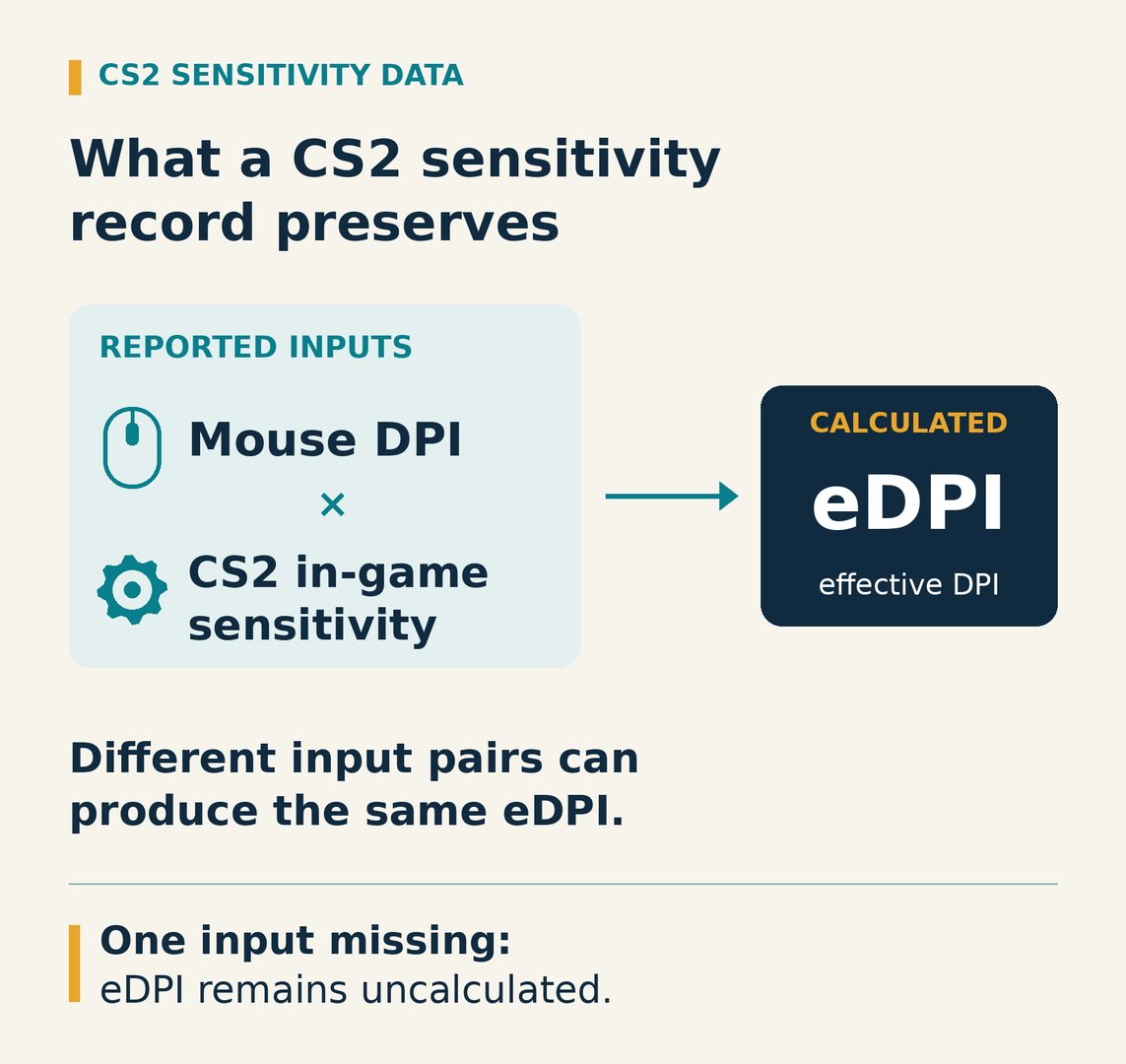
The two inputs therefore need to stay together at the response level. Each eDPI calculation should use the DPI and in-game sensitivity belonging to the same configuration record.
That pairing also affects summaries. Multiplying the average DPI by the average in-game sensitivity does not generally produce the average of the individual eDPI values. Computing eDPI for each complete pair first preserves which settings belonged together before the results are summarized.
Keeping the inputs makes the result traceable. An analyst can see which reported values produced a calculation and check the arithmetic without reconstructing the answer. A derived field should remain identifiable as calculated data, rather than appearing to be another value directly reported by the player.
Corrections need to remain distinct from changes in configuration. Correcting a reported input requires recalculating eDPI and retaining a record of the earlier response. A new report of changed settings describes a different configuration, so it needs its own date rather than silently replacing the earlier record.
A completed pair also remains self-reported information. Numerical formatting and correct multiplication establish that the calculation follows the entered values; they do not independently verify that those values match the player’s configuration. Describing the record as reported settings keeps that evidential limit visible without discarding useful responses.
Tie each answer to the activity and time
The activity gives a setting its context. In a September 2026 account of mouse testing, PC Gamer’s James Bentley described different DPI preferences for desktop use and aiming in Aimlabs. His account concerns his own experience, not a recommendation established for CS2.
A general question about preferred mouse settings does not necessarily identify the configuration used in CS2. The game needs to remain explicit in the question and the stored field description. A record of desktop preferences and a record of CS2 settings answer different questions, even when both concern the same mouse.
Current, usual and preferred settings also need distinct treatment. Current settings describe what is configured at the relevant time. Usual settings ask about a recurring pattern of use. Preferred settings ask for a judgment. A survey should not move between those meanings while treating the answers as the same measure.
Time adds another boundary. Asking about the current configuration differs from asking about the configuration used during a specified earlier period. The wording needs to identify that period consistently, while leaving room for respondents to acknowledge that they cannot recall a value.
Recording the collection date adds context to the response. It does not establish when the player adopted the setting, how long they used it or whether their preference changed. Those are separate questions requiring their own answers. The date of answering and the period described should therefore remain distinguishable in the dataset.
When a survey is repeated, consistent definitions make the records interpretable across collection periods. A change in question meaning should remain visible rather than being treated as a change in players’ configurations.
Match conclusions to the records available
With the fields defined, a survey can describe the configurations reported by its respondents. Its summaries need to identify which records support each calculation, including the number containing both required inputs.
Total responses and complete sensitivity pairs are different counts. A submitted questionnaire can contribute information without containing everything needed to calculate eDPI. Reporting the completeness of the relevant fields preserves that distinction instead of making missing information disappear from the account of the survey.
An unanswered DPI field is not a reported value of zero. An unknown in-game sensitivity does not supply the missing input for a completed calculation. Leaving eDPI uncalculated preserves the boundary between incomplete information and a usable pair.
The available fields can support different summaries, provided their bases remain explicit. A summary of reported DPI can include records with a known DPI even when in-game sensitivity is missing. An eDPI summary requires both. Presenting those summaries together does not make their contributing records identical.
Percentage-based reporting needs the same clarity. A percentage of complete input pairs describes that subset of records. A percentage of all submitted responses uses a different base, and its label should identify that base rather than leaving readers to infer it.
The counting unit needs to remain clear, too. A record of a configuration is not automatically a count of a distinct player. Repeated responses require a stated treatment before a summary can be described as representing people rather than entries.
Claims about improved play require different evidence. A configuration record contains no performance result by itself, and professional use does not turn a setting into a demonstrated cause of success. The survey describes the responding records; it does not automatically establish what all CS2 players use.
Comfort ratings can accompany configuration data, provided their meaning remains separate. They record reported experience rather than a measured improvement in aiming. Preserving that distinction allows a survey to describe both the setup and the player’s assessment without making either answer stand in for the other.
The calculation provides a common measure for the survey; the separate inputs preserve the configurations that produced it.
Get insights.
Unlock value.
- 14-day free trial
- Set up in minutes
- End-to-end encrypted